

Interactive walkthrough
Click through Empiraa Signal. Pick the journey for your seat.
This self-guided walkthrough steps through real screens, one point at a time. Take the journey written for your role, or the full tour from an empty list to a signed deal.
No sign-up. Real screens from a working workspace.
- 14 days free
- No credit card
- Unlimited users
6 journeys
- Anyone: From a campaign to a signed deal, in the order it happens.
- a sales rep: A day that starts with a list, not a blank screen.
- a sales manager: Where the number stands, and which deals are lying to you.
- a founder: Proper sales process, without a sales ops hire.
- a CEO or owner: A forecast you can take to the board and defend.
- whoever runs marketing: A campaign you can follow all the way to the deals it brought in.
The walkthrough
Start where you sit.
The walkthrough is running below. Switch to the journey for your seat, step through it yourself, or press Play and watch.
Empiraa Signal, live
The full tourAnyone
From a campaign to a signed deal, in the order it happens.
Step 1 of 70
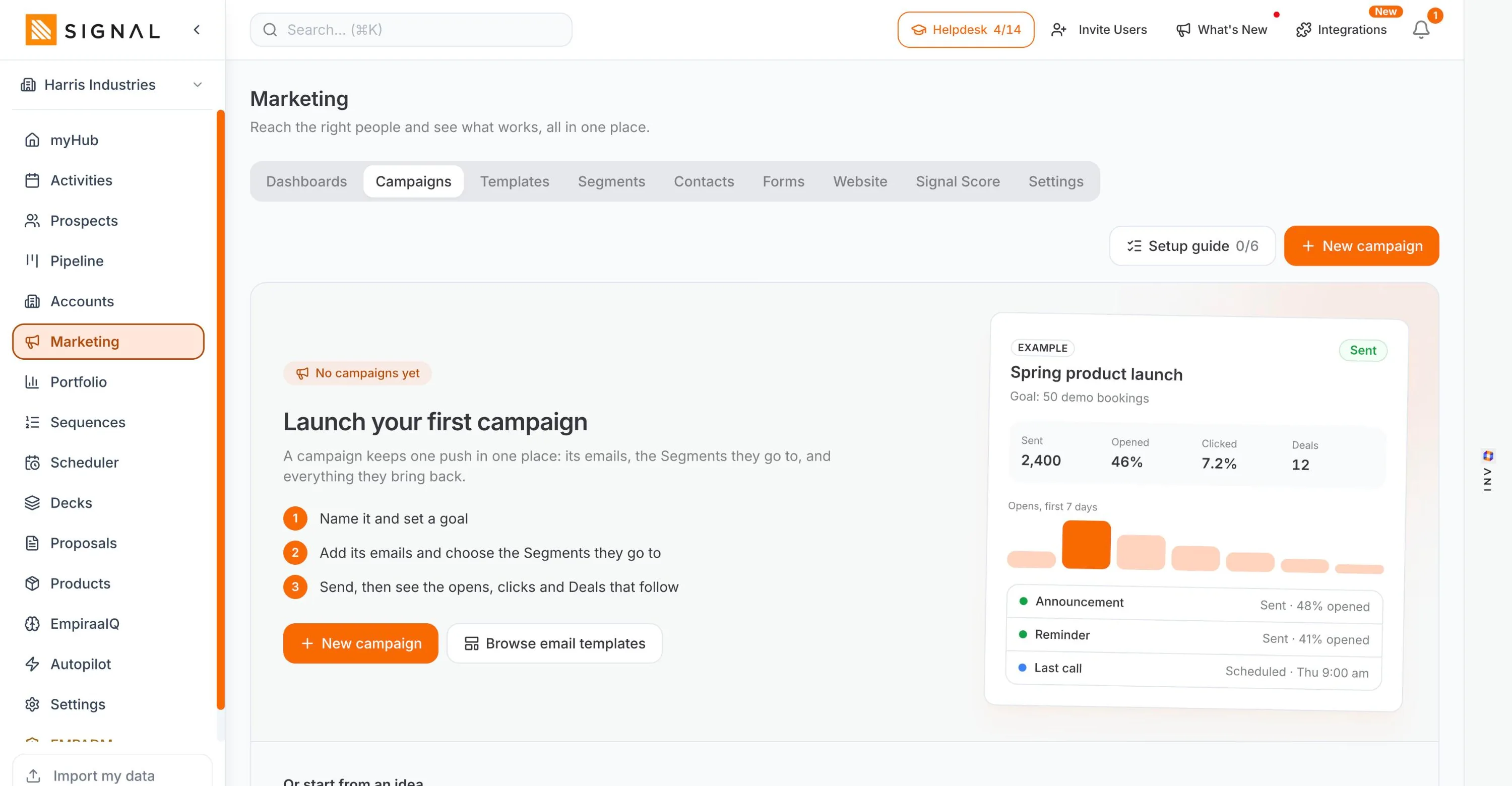
1One push, in one record
A campaign is not a send
It holds its emails, the segments they go to and everything they bring back. Name it, give it a goal, and the report answers whether it worked rather than only what it did.
Use the arrow keys to move between steps.
The journeys
Five routes through the same platform.
A rep and a CEO do not need the same tour. Each route takes its own screens, in the order that seat would meet them. Start any of them from here.
Pick a route
Anyone
The full tour
From a campaign to a signed deal, in the order it happens.
17 screens70 stepsabout 9 min
Start this route- Marketing / CampaignsOne push, in one record
- Marketing / Signal ScoreA lead score with the working shown
- Prospect Hub / SparkDescribe who you sell to, not who you know
- Prospect HubEverything you found, before it clutters the pipeline
- Prospect Hub / ContactsThe people, with a way to reach them
- SequencesOutreach that keeps going on the days you cannot
- Sequences / step 1Write it once, and it lands personally
- ActivitiesNothing goes quiet by accident
- Scheduler / booking pageLet them pick the time
- PipelineTwelve deals, and the truth about them
- DecksSend it, then see who read it
- ProposalsPriced, sent and tracked
- myHubThe screen you open first
- PortfolioThe forecast, against the budget
- Empiraa IQ / Signal 360Ask your own numbers a question
- ANI, open over Empiraa IQThe answer is read, not written
- AutopilotHow much you let it do
a sales rep
A rep’s week
A day that starts with a list, not a blank screen.
9 screens36 stepsabout 5 min
Start this route- myHubThe screen you open first
- Prospect Hub / SparkDescribe who you sell to, not who you know
- Prospect Hub / ContactsThe people, with a way to reach them
- SequencesOutreach that keeps going on the days you cannot
- Sequences / step 1Write it once, and it lands personally
- ActivitiesNothing goes quiet by accident
- Scheduler / booking pageLet them pick the time
- PipelineTwelve deals, and the truth about them
- DecksSend it, then see who read it
a sales manager
Running the number
Where the number stands, and which deals are lying to you.
8 screens34 stepsabout 6 min
Start this route- PipelineTwelve deals, and the truth about them
- PortfolioThe forecast, against the budget
- Empiraa IQ / Signal 360Ask your own numbers a question
- ANI, open over Empiraa IQThe answer is read, not written
- ActivitiesNothing goes quiet by accident
- AccountsOnce they buy, nothing goes missing
- Empiraa IQ / Territory BuilderWho owns what, set by rule
- AutopilotHow much you let it do
a founder
Selling while you do everything else
Proper sales process, without a sales ops hire.
7 screens28 stepsabout 4 min
Start this route- Marketing / CampaignsOne push, in one record
- Prospect Hub / SparkDescribe who you sell to, not who you know
- Sequences / step 1Write it once, and it lands personally
- Scheduler / booking pageLet them pick the time
- PipelineTwelve deals, and the truth about them
- ProposalsPriced, sent and tracked
- PortfolioThe forecast, against the budget
a CEO or owner
The number, and whether to believe it
A forecast you can take to the board and defend.
6 screens26 stepsabout 5 min
Start this route- PortfolioThe forecast, against the budget
- Empiraa IQ / Signal 360Ask your own numbers a question
- ANI, open over Empiraa IQThe answer is read, not written
- PipelineTwelve deals, and the truth about them
- AccountsOnce they buy, nothing goes missing
- AutopilotHow much you let it do
whoever runs marketing
Marketing that reaches the pipeline
A campaign you can follow all the way to the deals it brought in.
6 screens26 stepsabout 5 min
Start this route- Marketing / CampaignsOne push, in one record
- Marketing / SegmentsA list goes stale. A segment does not.
- Marketing / TemplatesA hundred emails that already look like you
- Marketing / Signal ScoreA lead score with the working shown
- Prospect Hub / ContactsThe people, with a way to reach them
- PipelineTwelve deals, and the truth about them
By stage
Every screen in the walkthrough.
22 screens across five stages, in the order a deal actually moves. The full tour walks 17 of them; the role routes pick the ones that seat lives in.
The five stages
- 01
Market
The campaigns, segments, templates and lead score that bring people in, on the same records the reps work.
4 screens- Marketing / CampaignsOne push, in one record
- Marketing / SegmentsA list goes stale. A segment does not.
- Marketing / TemplatesA hundred emails that already look like you
- Marketing / Signal ScoreA lead score with the working shown
- 02
Find
Work out who to call, get their details, and keep them somewhere sensible until they are real.
4 screens- Prospect Hub / SparkDescribe who you sell to, not who you know
- Prospect HubEverything you found, before it clutters the pipeline
- Prospect Hub / ContactsThe people, with a way to reach them
- AccountsOnce they buy, nothing goes missing
- 03
Reach
Email, sequences, follow-up and a booking link, all sent from your own inbox.
4 screens- SequencesOutreach that keeps going on the days you cannot
- Sequences / step 1Write it once, and it lands personally
- ActivitiesNothing goes quiet by accident
- Scheduler / booking pageLet them pick the time
- 04
Close
The pipeline, the deck, the proposal and the price list that feeds them both.
4 screens- PipelineTwelve deals, and the truth about them
- DecksSend it, then see who read it
- ProposalsPriced, sent and tracked
- ProductsPriced once, used everywhere
- 05
Run
The forecast against budget, the questions you can ask your own data, and how much of it runs itself.
6 screens- myHubThe screen you open first
- PortfolioThe forecast, against the budget
- Empiraa IQ / Signal 360Ask your own numbers a question
- ANI, open over Empiraa IQThe answer is read, not written
- Empiraa IQ / Territory BuilderWho owns what, set by rule
- AutopilotHow much you let it do
Questions
Walkthrough questions, answered.
Are these real Empiraa Signal screens?
Yes. Every screen in the walkthrough comes from Empiraa Signal, using a demo workspace for a commercial mechanical services business. Nothing is a mockup, and every company and person on them is invented.
Which journey should I take?
Pick the one that matches your seat. A rep sees the day from the morning list to the deck going out, a sales manager sees the forecast and the coverage gap, a founder sees the short route for someone who only sells part of the week, and a CEO sees the number and whether to believe it. The full tour covers the platform end to end.
How long does it take?
A role journey runs about five minutes, and the full tour about eight. You can click through at your own pace, press Play to have it advance for you, or jump straight to any screen.
Can I just try it instead?
Yes, and most people should. The trial is 14 days with no credit card, and every plan includes unlimited users, so you can put the whole team in it while you decide. See what each plan includes.
Does the walkthrough cover every feature?
It covers the screens a sales team uses most. The features page goes through every area of the app, area by area. See all features.
Do I have to use all of it?
No. Plenty of teams start with prospecting and the pipeline, then turn on sequences, decks and proposals as they need them. Nothing is locked behind a higher plan, so adding a part of it later costs nothing extra.

Question not answered here? Ask ANI and get a straight answer.
Now run it on your own pipeline.
14 days free. No credit card. Unlimited users from the first minute.