

Activities and follow-up
Deals are not lost. They go quiet.
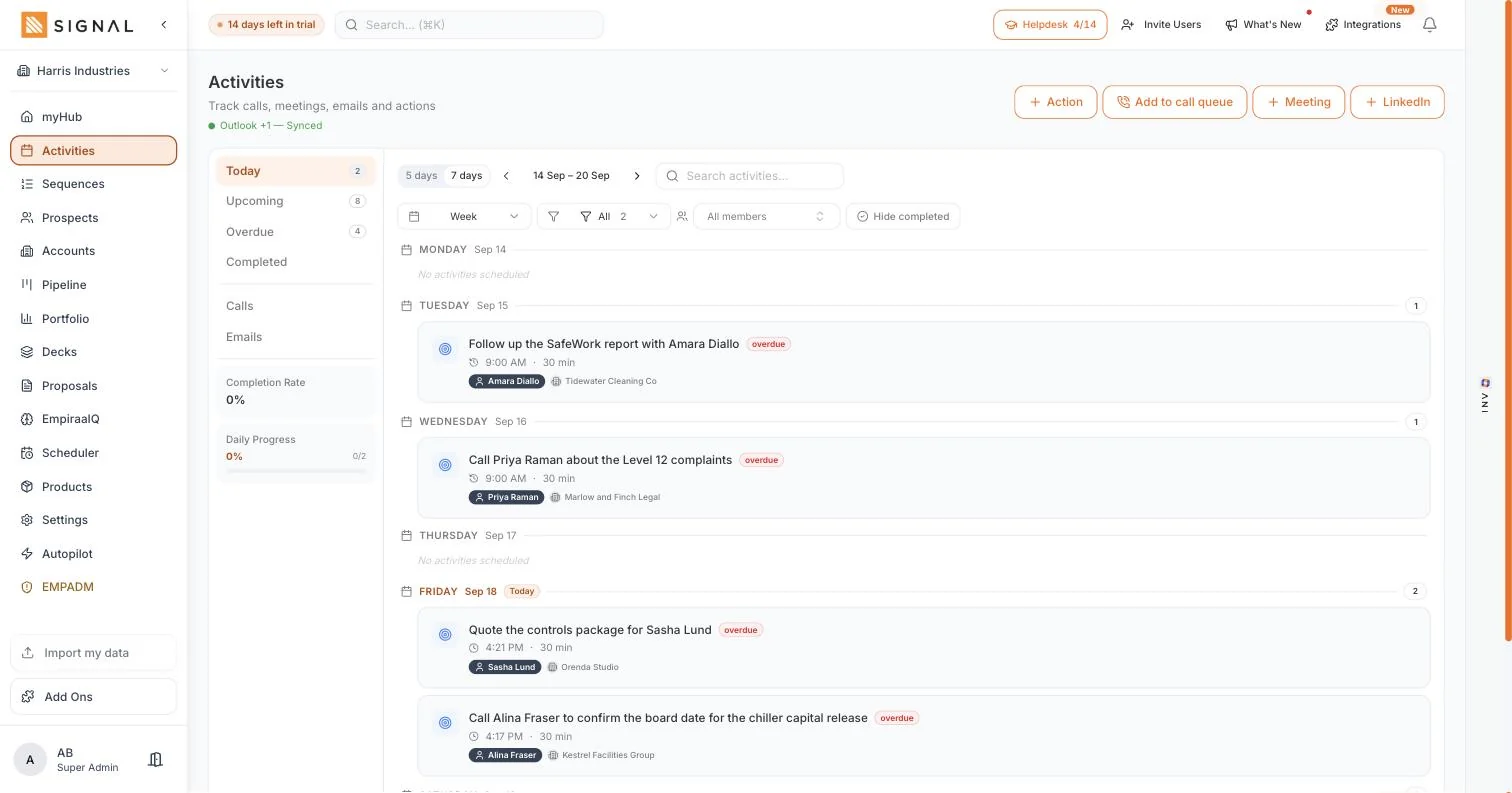
Deals are not lost on the day. They go three weeks without a call, then a month, then they are gone. Activities puts every call, meeting and next step on the deal it belongs to, overdue first.
14 days free. No credit card.
- 14 days free
- No credit card
- Unlimited users
The problem
The follow-up lives in four places.
A notebook, a calendar, a flagged email and your memory. None of them talk to the pipeline.
Why things slip
It is not attached to anything
A task that says "call Priya" tells you nothing about which deal it moves, so it gets done last or not at all.
Overdue is invisible
Yesterday’s list looks the same as tomorrow’s. Without overdue in front of you, the oldest follow-up is the one that keeps being skipped.
The pipeline never finds out
You made the call, but the deal card still says nothing has happened for three weeks, so the forecast is wrong and the manager asks anyway.
How it works
One list, and it knows what everything belongs to.
The day
Today, upcoming and overdue
Three numbers at the side of the screen tell you whether the week is under control before you open anything. Overdue is first, because the follow-up you skipped last Tuesday is the one most likely to cost you a deal.
- A day view for working, a week view for planning
- Filter by type, by member or by whether it is done
- Calls and emails have their own lists when you want to work in one mode
Every action carries its deal and its person
An activity is created against a deal, an account or a prospect, so the row you are looking at tells you who to call, about what, and where it sits. You do not open three screens to make one call.
- Contact and account shown on the row, with the number one click away
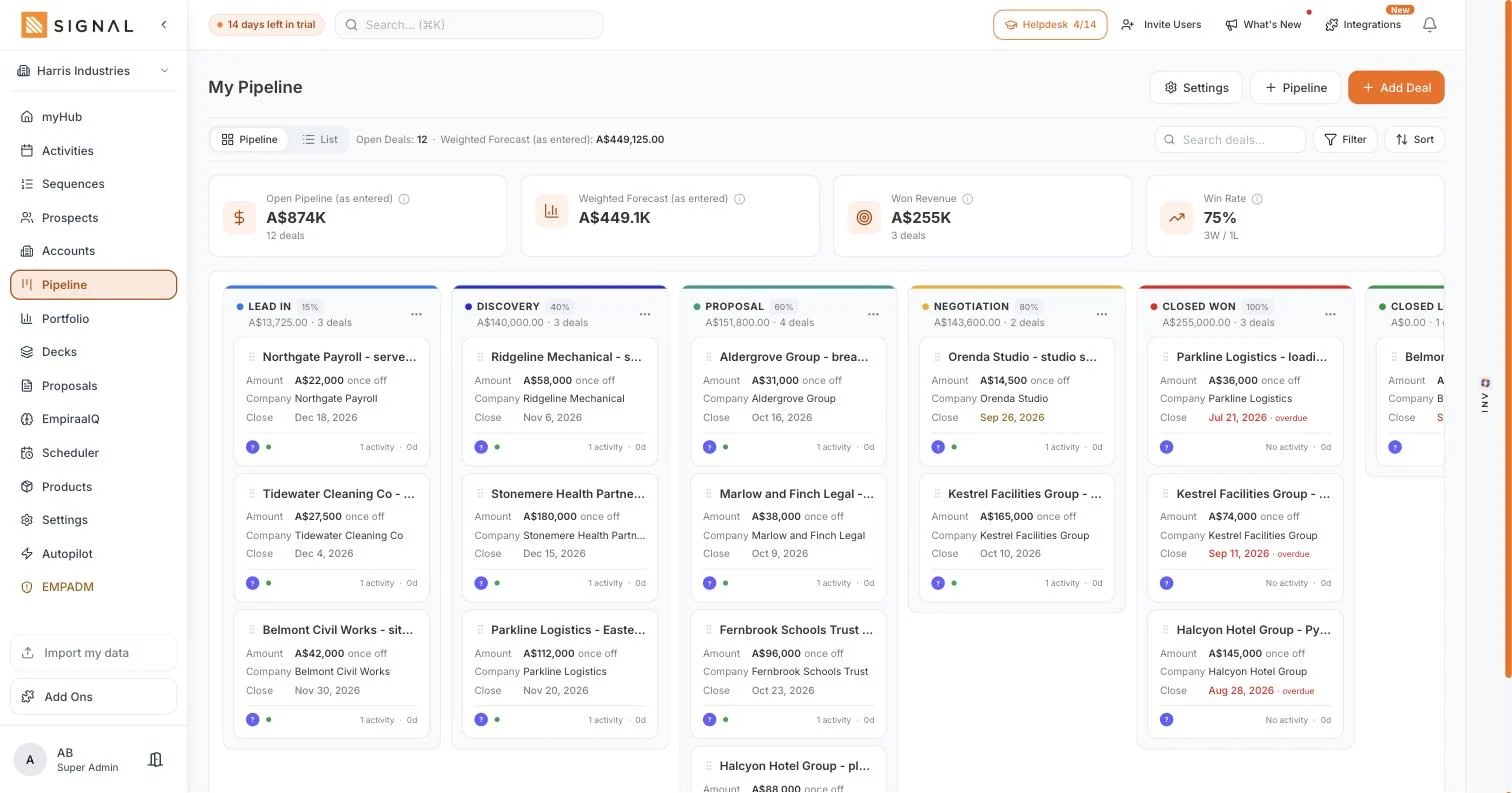
- The deal card shows how long since anything happened, from this list
- Notes and outcomes stay on the deal, so the history is in one place
And ANI builds the day if you want it to
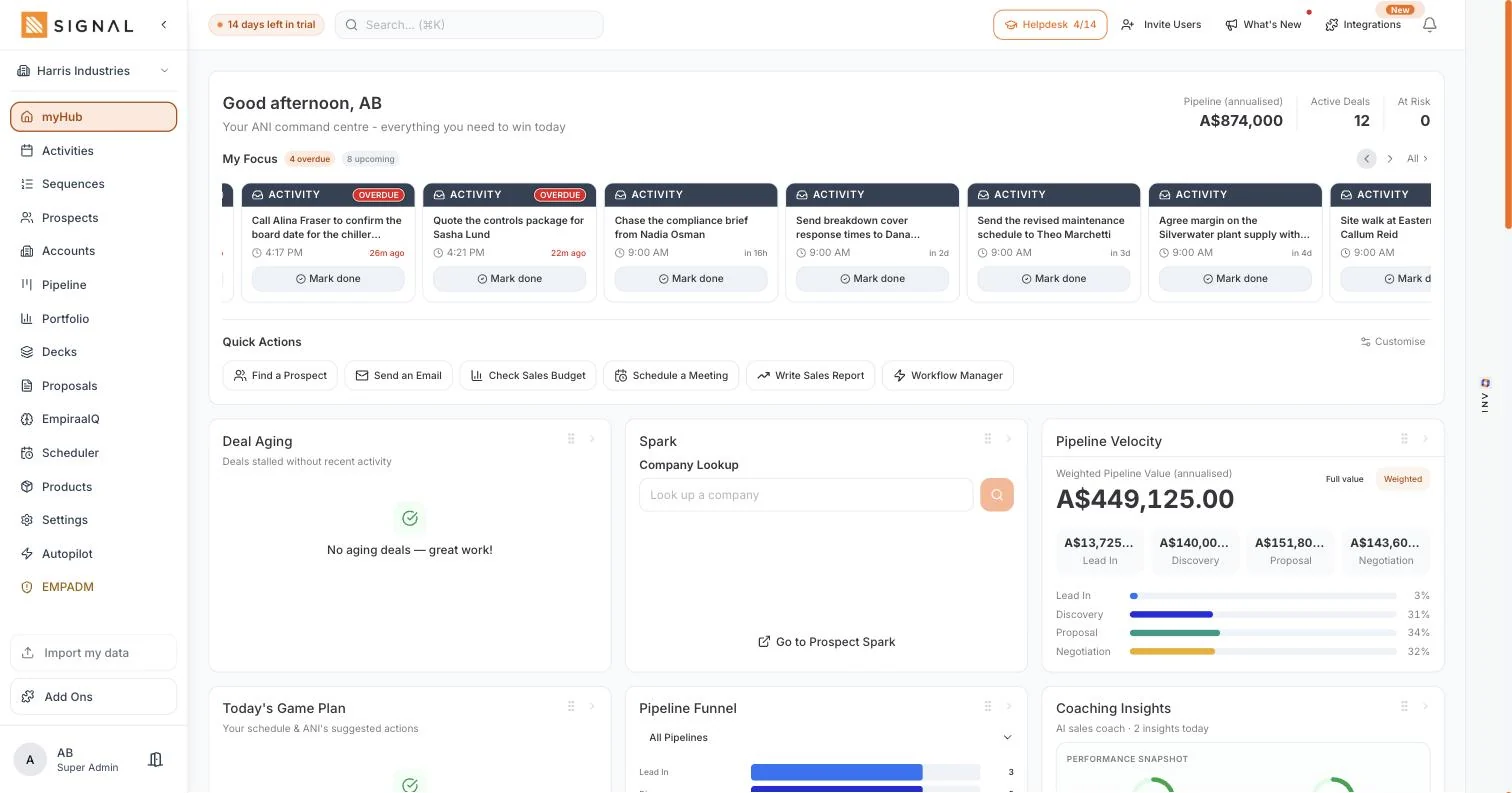
Ask ANI to plan your day and it reads the pipeline, the overdue list and the deals going quiet, then proposes an order to work in. You can take it, change it, or ignore it entirely.
- Suggested actions based on deal risk and what has not been touched
- A call queue for a block of dialling, built from a filter
- Nothing is scheduled or sent without you agreeing to it
Every plan has every feature. The difference between them is volume.
Explore Signal freeWhat you get
Small things that decide deals.
In activities
Calls, meetings, emails and tasks
One list whatever the channel, so the follow-up is not split across four tools.
Overdue in front of you
Not buried in a filter. The oldest slipped follow-up is the first thing the screen shows you.
Tied to the deal
Which is what lets the pipeline mark a deal at risk when nothing has happened on it.
A call queue
Build a block of calls from a filtered list and work down it without going back to a table.
Calendar sync
Meetings land in your calendar, and meetings booked through your scheduler land here.
Learn moreTeam view
Filter by member to see whose follow-up is slipping, without asking anyone to report on it.
Getting started
Four minutes a day.
Which is roughly what this costs, and roughly what it saves in a single recovered deal.
The habit
- Every morning
Open the day
Overdue first, then today. It takes about thirty seconds to see where you are.
- As you go
Work the list
Call, email, mark done. The deal updates itself as you go.
- Every time
Set the next step
Before you close a deal card, put the next action on it. This is the whole discipline.
- Weekly
Check the quiet ones
Filter for no next step on a Friday and nothing goes three weeks without a call.
By role
What it changes, seat by seat.
Who feels it
A sales rep
The list replaces the notebook, and nothing sits for three weeks because you forgot it existed.
Learn moreA sales manager
You can see which deals have gone quiet without asking a single rep what they have been doing.
Learn moreA founder
The follow-up survives the three days a week you are not selling.
Learn moreA new starter
Their first week is a list to work rather than a set of instructions to remember.
Learn moreQuestions
Follow-up questions, answered.
Does it sync with my calendar?
Yes. Meetings you create in Signal land in your calendar, and meetings booked through your scheduler land back in Signal against the right deal. Gmail and Outlook both connect.
What makes a deal go at risk?
A close date that has passed, or a stretch with no activity on it. Both come from this list, which is why attaching follow-up to a deal matters rather than keeping it in a separate task app.
Can ANI plan my day?
It can propose one, built from deal risk, overdue follow-up and what has gone quiet. You decide whether to take it. Nothing is scheduled, sent or moved without your say-so. How much ANI may do on its own.
Can I see the team’s follow-up, not just mine?
Yes. Filter by member, or look at coverage on the Account Hub to see what share of the base anyone has touched. It is the number that catches a customer going quiet before the renewal does.
Is there a call queue?
Yes. Build one from a filtered list and work down it in a block, rather than going back to a table between every call.
Does this cost extra per user?
No. Every Signal plan includes unlimited users, and activity limits are metered on the workspace rather than per seat. See pricing.

Question not answered here? Ask ANI and get a straight answer.
Stop losing deals to silence.
14 days free. No credit card. Unlimited users from the first minute.