

Features
The features that keep strategy moving. From the plan to the board report.
Empiraa GPS features cover the whole strategy cycle. Build the plan, give every priority an owner, run the weekly rhythm, and report from live data, with ANI, the AI strategist, built in. Open any area below to see its tabs, a real screen and what leadership teams use it for.
- Set up with your plan
- Unlimited users
- 30-day pilot
Explore Empiraa GPS
Every part of the app, area by area.
Pick an area to see the tabs inside it, a real screen from a working plan, what leadership teams use it for, and everything it includes.
myHub
Everyone opens on their part of the plan.
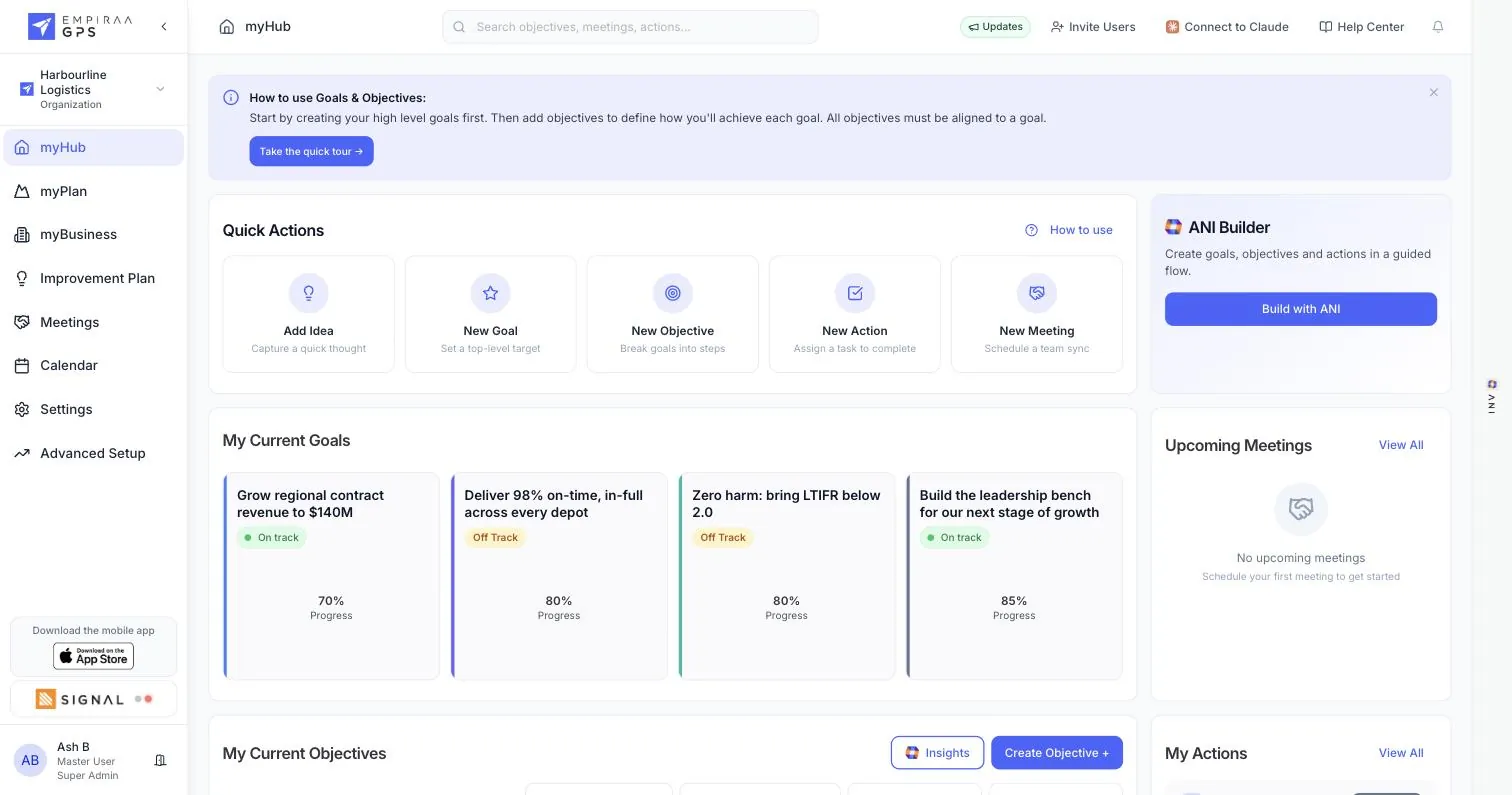
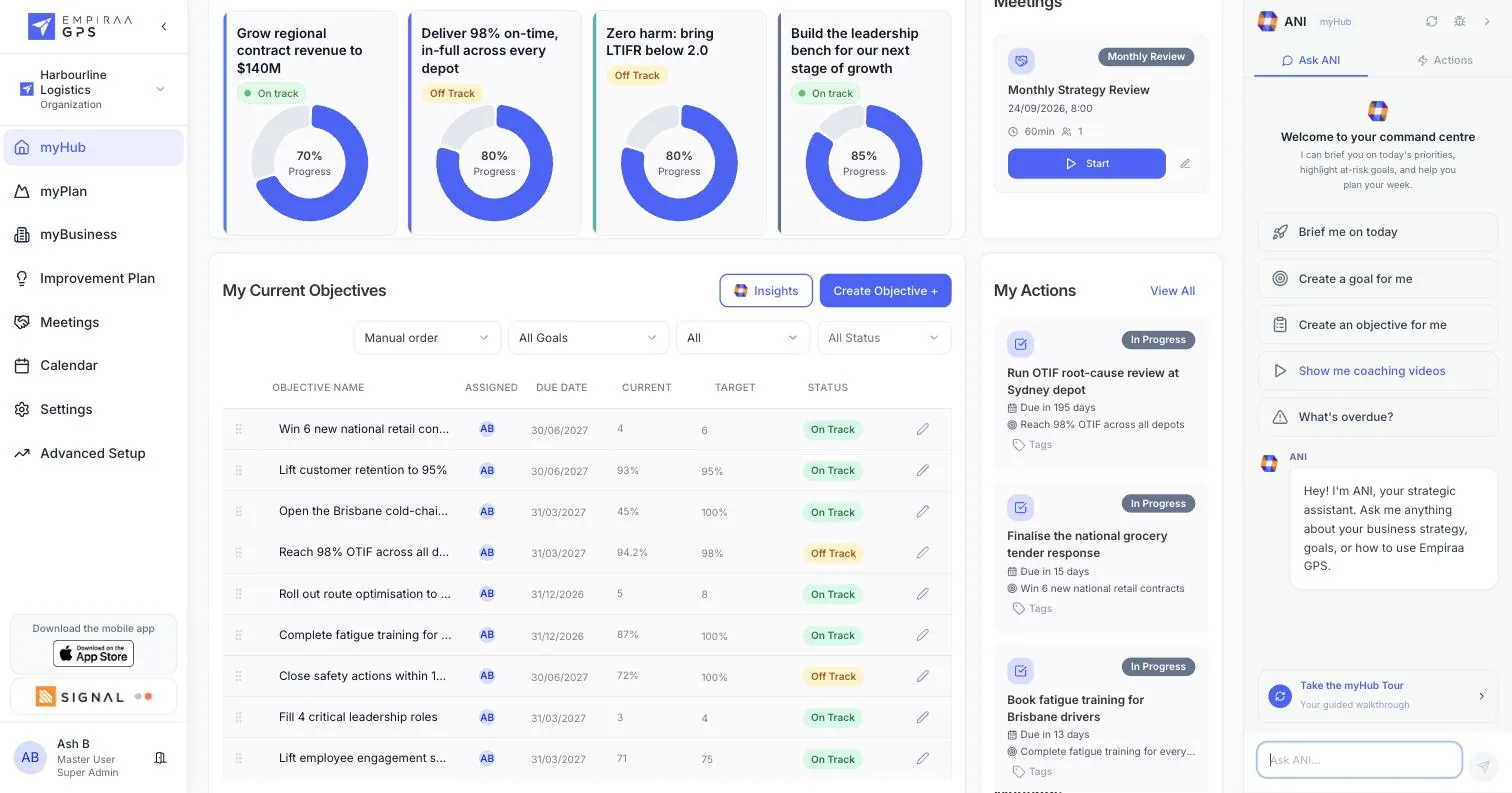
The home screen. Each person sees the goals they own, their objectives with current and target values, the meetings coming up and the actions due, plus quick actions to add anything.
What leadership teams use it for
- Monday morningEvery leader sees what they own and what is due, without opening a spreadsheet.
- Before a check-inUpdate progress in seconds from the quick actions.
- A new leaderSees the plan and their part in it on day one.
Everything in myHub
- Your current goals with live progress and status
- Your objectives with assignee, due date, current value, target and status
- Sort and filter your objectives by goal and status
- Upcoming meetings
- Your actions, with the objective each one moves
- Quick actions: new goal, objective, action, meeting or idea
- Build with ANI in a guided flow
- Search across objectives, meetings and actions
myPlan
The whole strategy, five ways to work with it.
Where the strategy lives: one page for everyone, the year on a timeline, the quarter as a priority board, the thinking behind the plan, and the report that goes to the board.
Tabs in myPlan
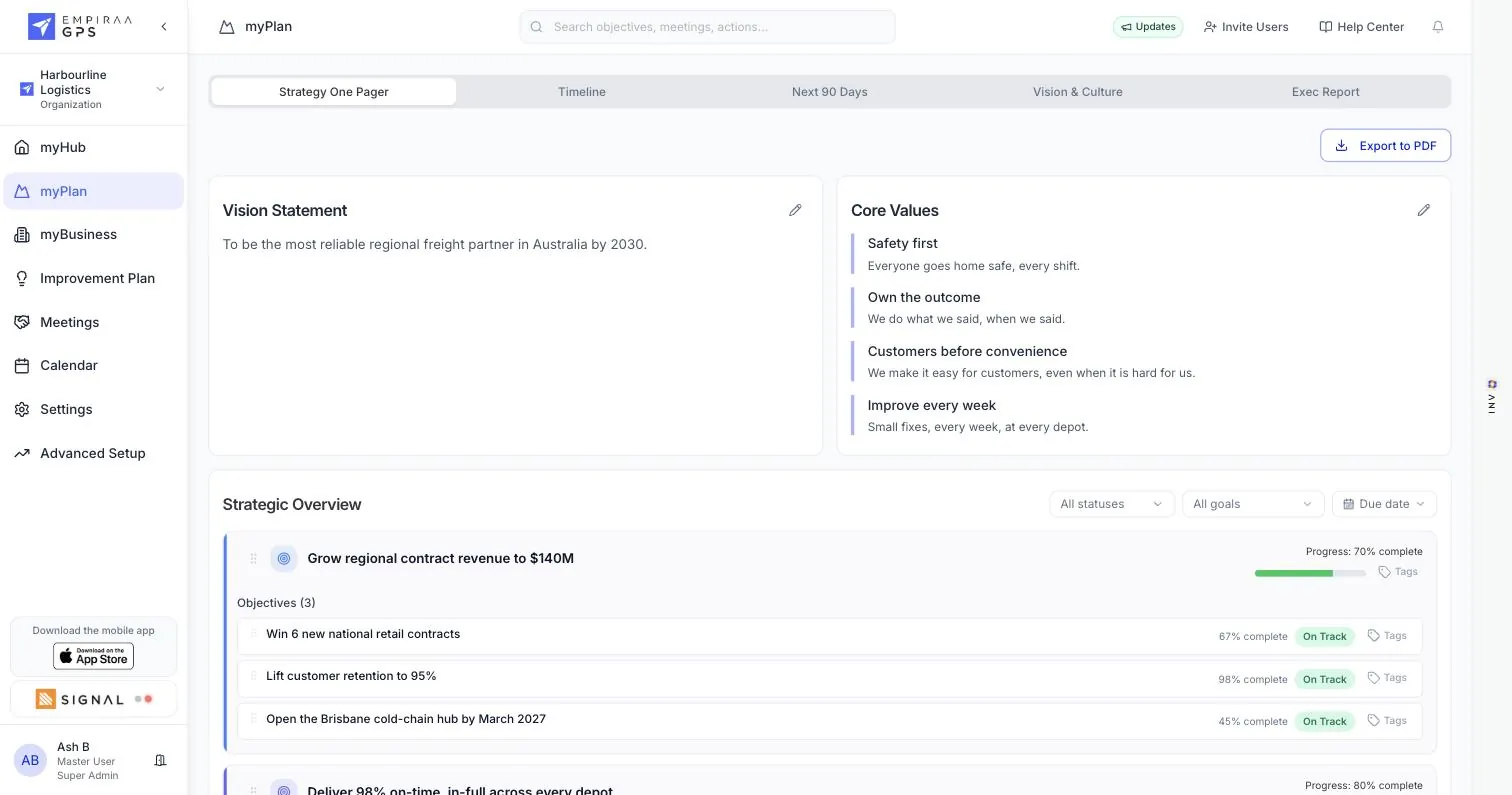
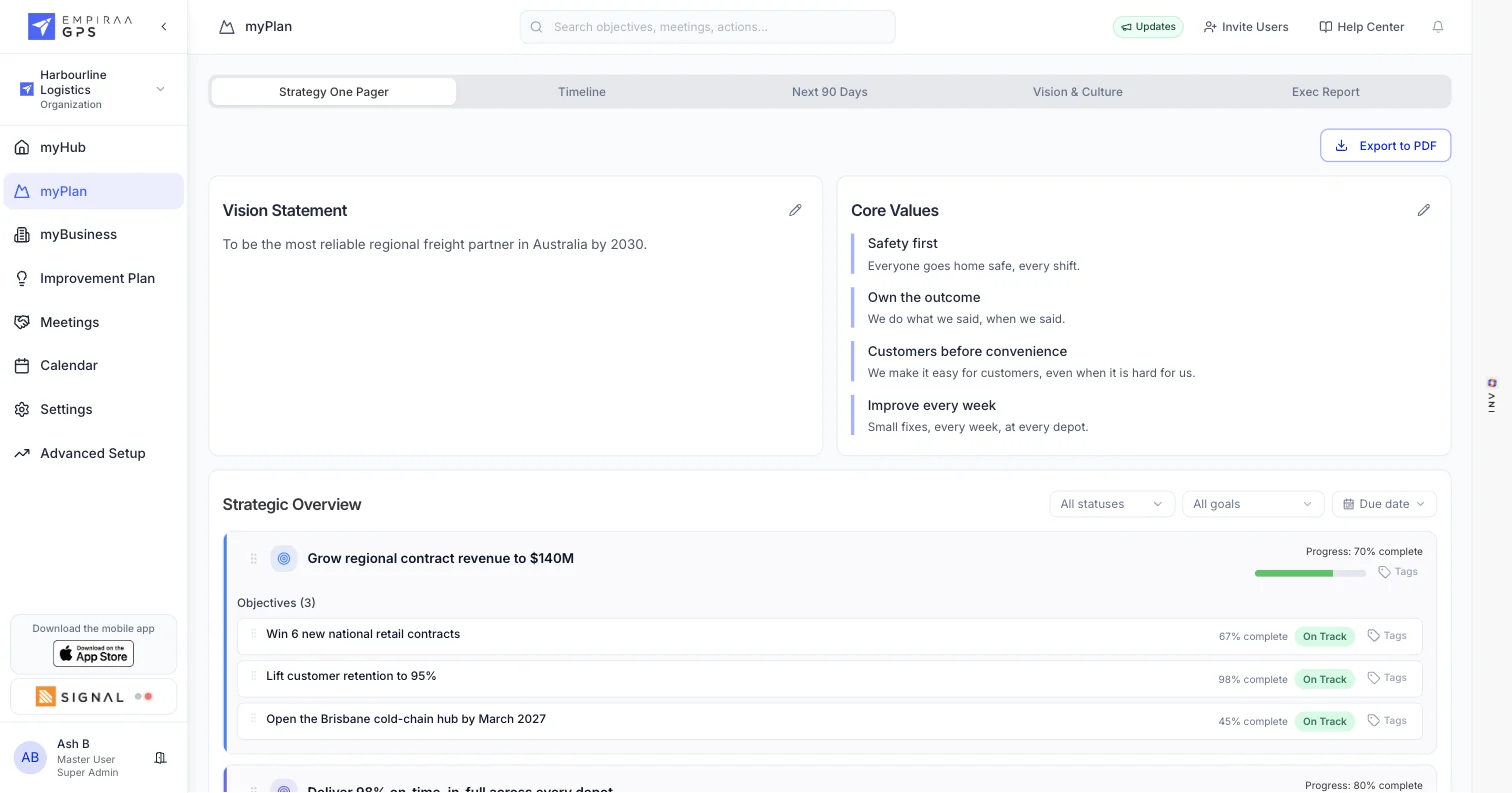
Strategy One Pager: Vision, core values and every goal with live progress.
What leadership teams use it for
- At the offsiteAgree the plan, then export the one pager to PDF before anyone leaves.
- Quarterly planningPrioritise the next 90 days as a team, straight from the plan.
- Board pack weekGenerate the report from live data, edit it and email it.
Everything in myPlan
- Strategy One Pager: vision statement, core values, goals and objectives with live status
- Export the one pager to PDF
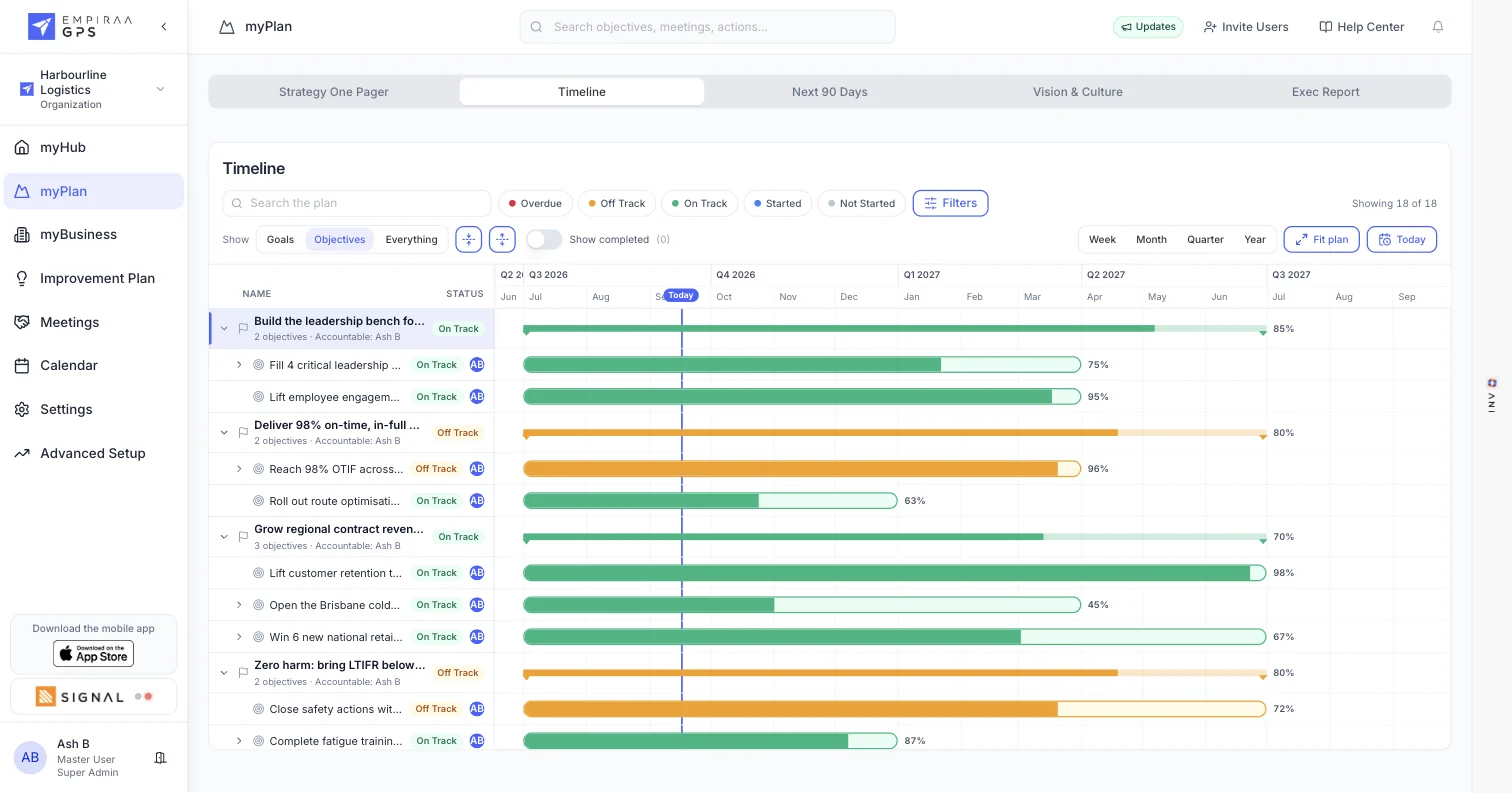
- Timeline: every goal and objective across the year, with a line marking today
- Week, month, quarter and year views, and a fit-the-plan view
- Filter the timeline by status, search it, and hide completed work
- Next 90 Days: the quarter as a priority board, high to low
- Drag goals, objectives and actions between priorities as a team
- Vision & Culture: purpose, what makes you different, and your BHAG
- Strategic Horizon Map: where you want to be in 1, 3, 5 and 10 years, with measures
- How you win: up to five strategic enablers
- Your culture: up to five behaviours
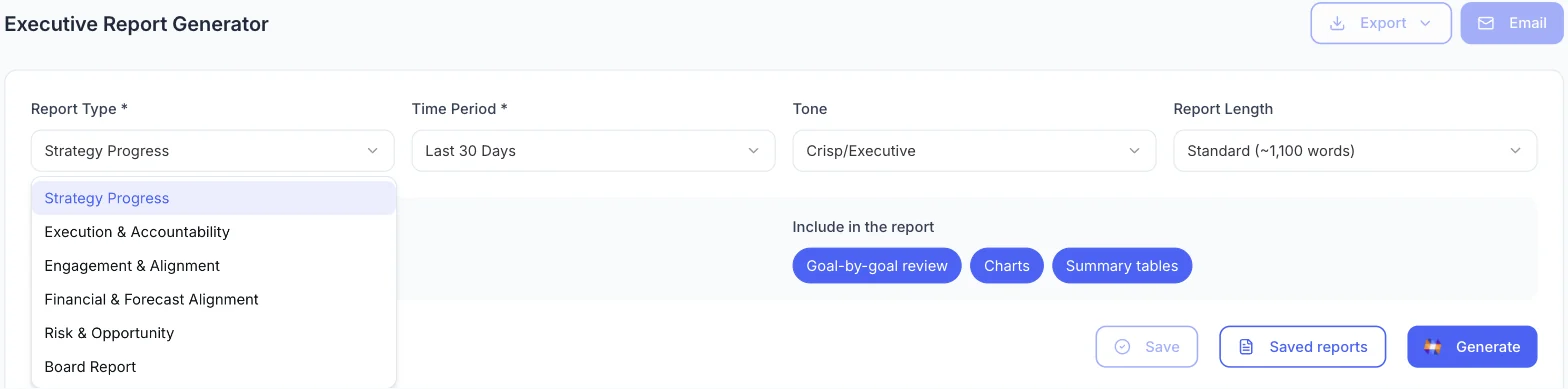
- Exec Report: pick the report type, period, tone and length
- Choose whether to include current, overdue and completed work
- Add a goal-by-goal review, charts and summary tables
- Edit the report, save versions, export or email it
An objective
Every measure, against where it should be today.
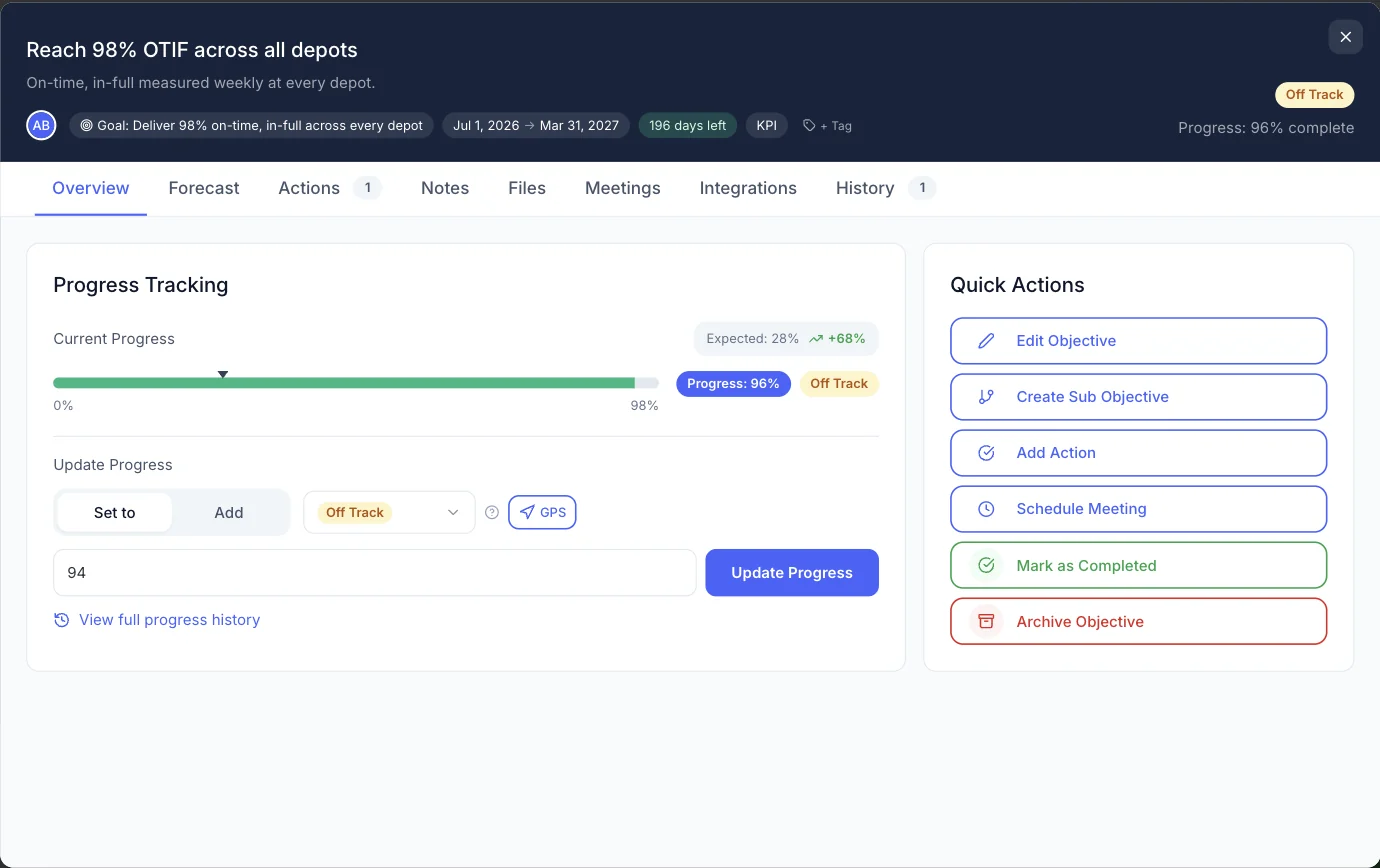
Goals hold the objectives that deliver them. Open one and you get its progress against expected pace, the work behind it, and everything that has happened to it.
Tabs in an objective
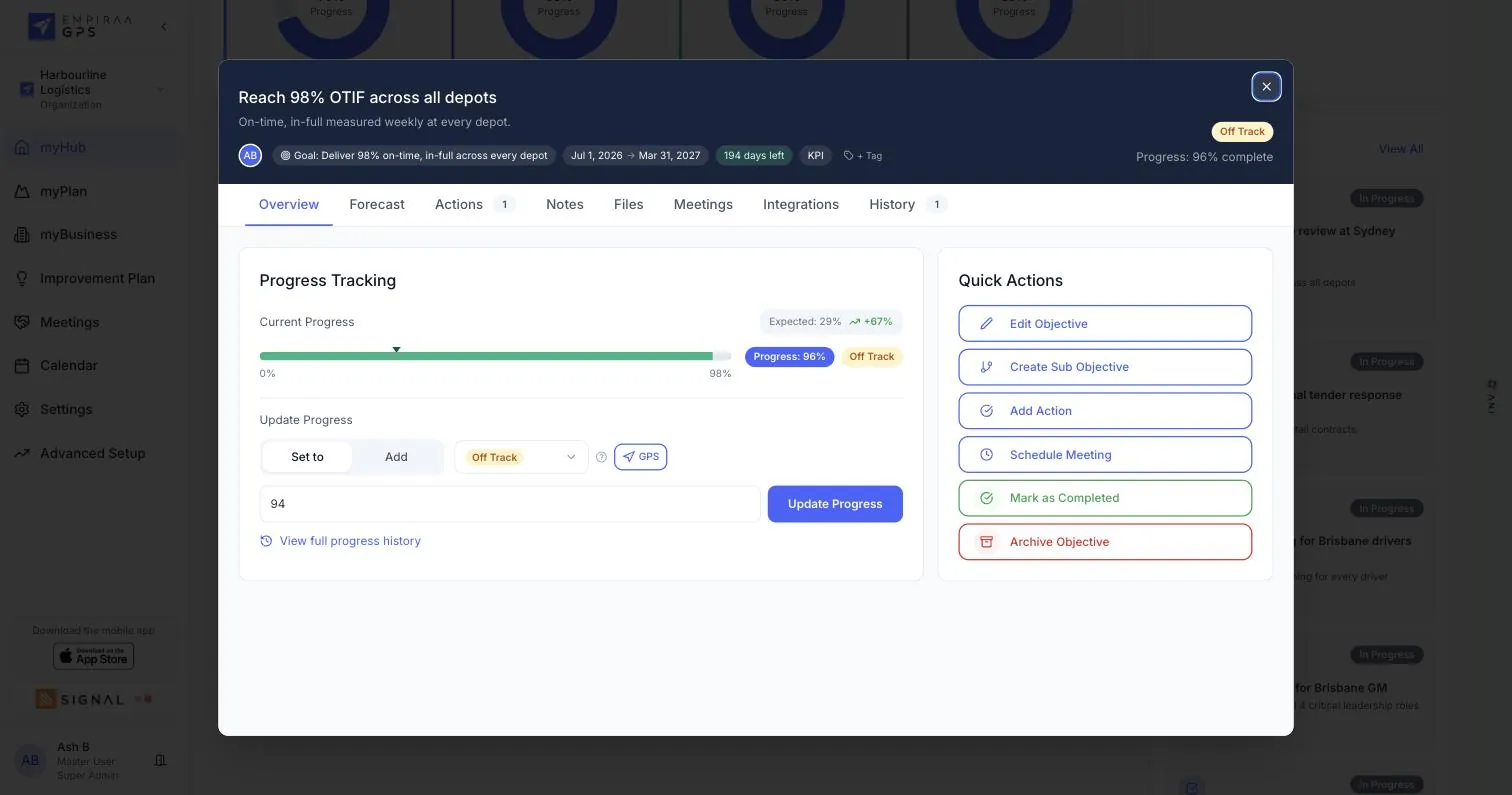
Overview: Progress against expected pace, and the update field.
What leadership teams use it for
- The weekly updateSet a new value or add to it, pick a status, and you are done.
- Catching a slipSee expected progress and the variance, weeks before the quarter closes.
- A board questionOpen the history and show how the number moved, and who moved it.
Everything in an objective
- Current progress, expected progress and the gap between them
- On track, off track, started, not started and overdue
- Target, start date, due date and the days left
- One owner for each objective, and one accountable owner for each goal
- Update by setting a new value or adding to the last one
- Full progress history
- Forecast: where recent pace lands it, the pace needed and when it hits target
- Notes: a discussion on the objective, with mentions, replies and link previews
- Files: the documents and evidence behind the measure
- Meetings: where this objective is on the agenda, upcoming and past
- Integrations: connect Xero, HubSpot, Microsoft 365 or Google Workspace to update the measure
- Actions with owners, due dates, priorities, repeats and private actions
- Sub-objectives for the pieces of a larger measure
- Tags to group objectives across goals
- Mark complete or archive
- KPIs, OKRs and quarterly Rocks, or your own method
- Private goals and objectives
myBusiness
Who owns what, and how you got here.
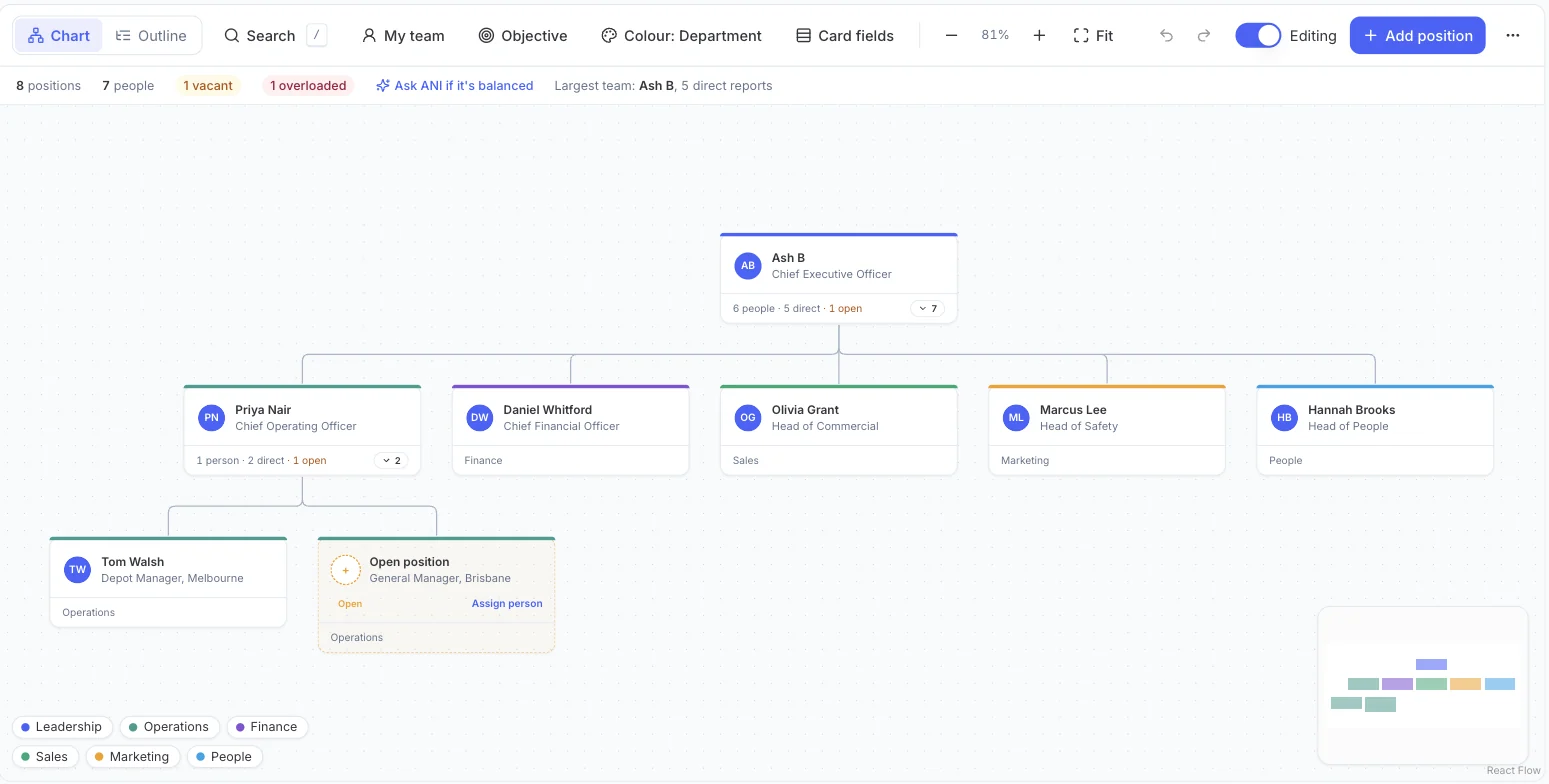
The Accountability Chart shows the business by who owns what, not just who reports to whom. Your Story keeps the milestones and events that shaped the company.
Tabs in myBusiness
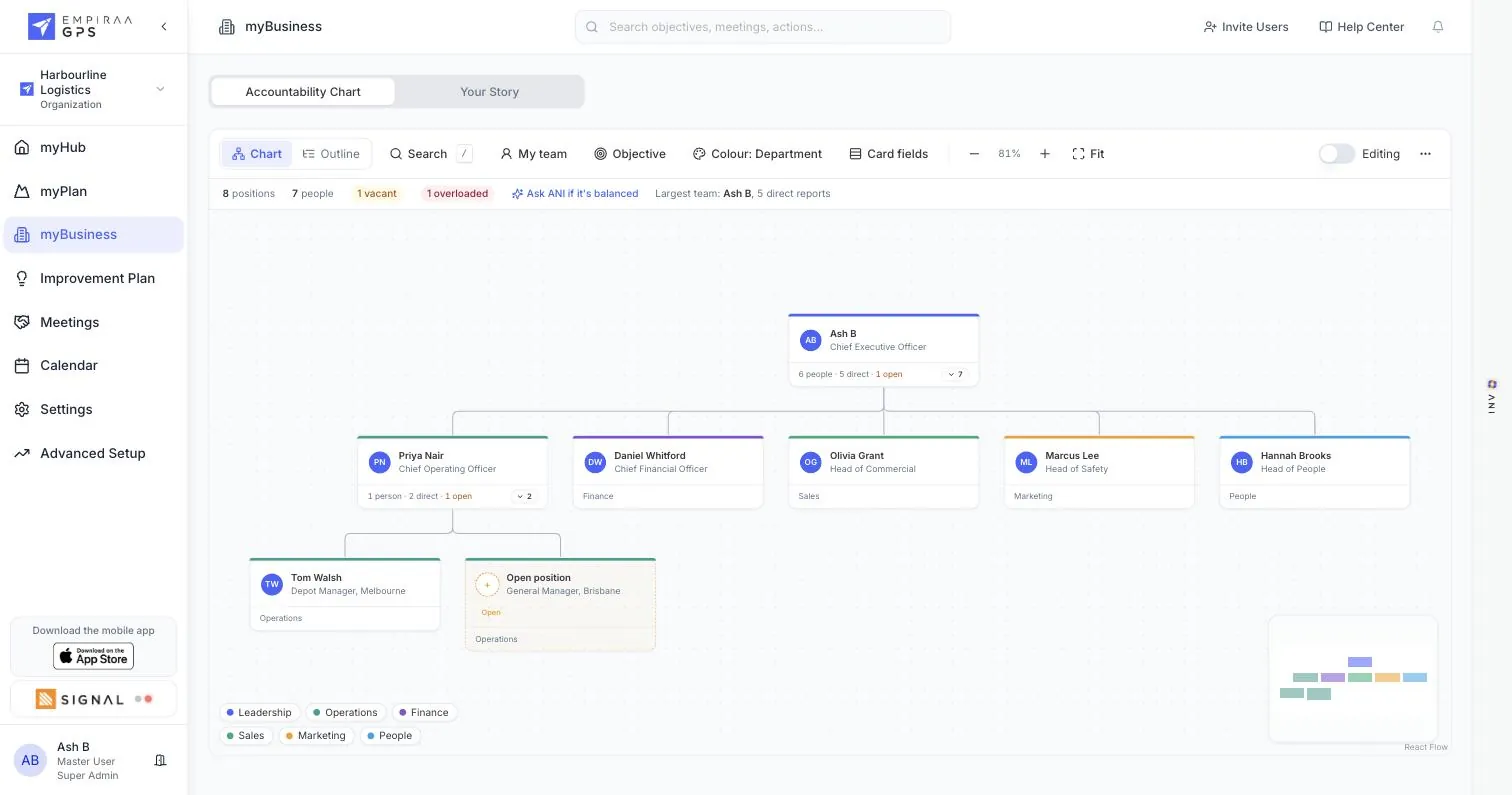
Accountability Chart: Owners by department, with open roles and overload flagged.
What leadership teams use it for
- Before the quarterCheck every priority has a real owner, and see the roles you are missing.
- DelegationAsk ANI whether the chart is balanced, and what the overloaded leader should hand over.
- Telling the storyKeep the milestones and major events new leaders and boards ask about.
Everything in myBusiness
- Accountability Chart in chart or outline view
- Owners by department, with colours by department
- Open and planned positions flagged
- Objectives shown on each seat
- Ask ANI if it is balanced
- Largest team and direct report counts
- People who are not on the chart yet
- Search the chart, see just my team, and choose the card fields
- Zoom, fit to screen and a mini map
- Your Story: milestones, goals and major events, filtered by type
Meetings
A weekly rhythm that ends in decisions.
Check-ins before the meeting, an agenda to run it from, and decisions that leave as owned actions. The dashboard shows how much time your leaders are spending in meetings, and what they get out of them.
Tabs in Meetings
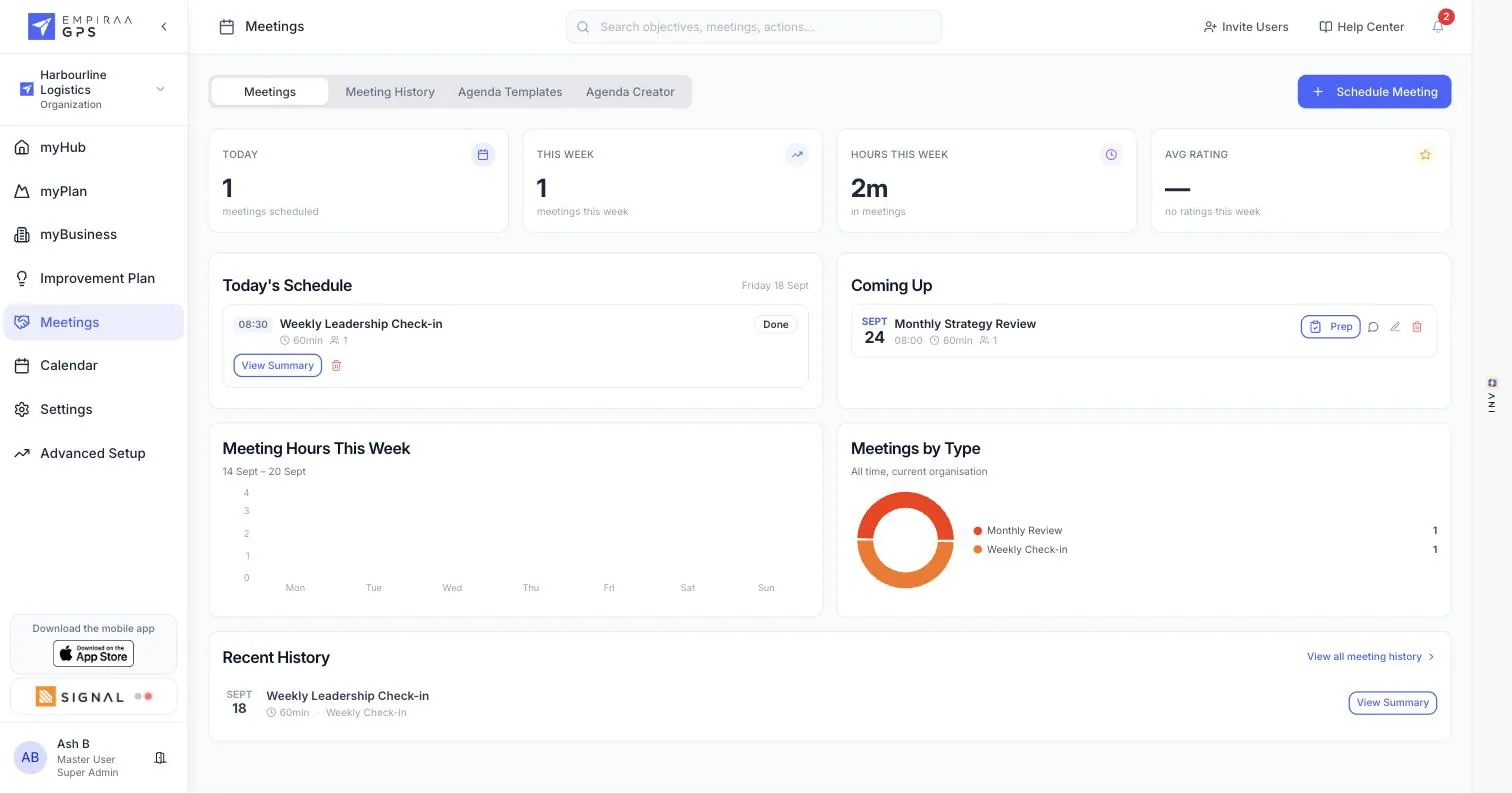
Meetings: Today’s schedule, what is coming up, meeting hours and ratings.
What leadership teams use it for
- Before the meetingEveryone shares good news, blockers and topics in a minute.
- In the meetingWork the issues the team raised instead of listening to updates.
- After the meetingANI summarises it, and the actions already have owners and dates.
Everything in Meetings
- Today’s schedule and what is coming up
- Meeting hours a week, average rating and meetings by type
- Meeting history, searchable by title, type, attendee, notes or summary
- A decisions view of everything recorded in past meetings
- Weekly check-ins, monthly reviews, project kickoffs, retrospectives, one-on-ones and workshops
- Agenda templates by meeting type
- An agenda creator: drag operational, strategic and review components into a template
- Set a default duration, meeting type and description for a template
- Schedule a meeting from any objective
- Live meetings you can rejoin
- AI meeting summaries
- Teams meetings with Microsoft 365
A meeting
Everyone arrives ready, and leaves with actions.
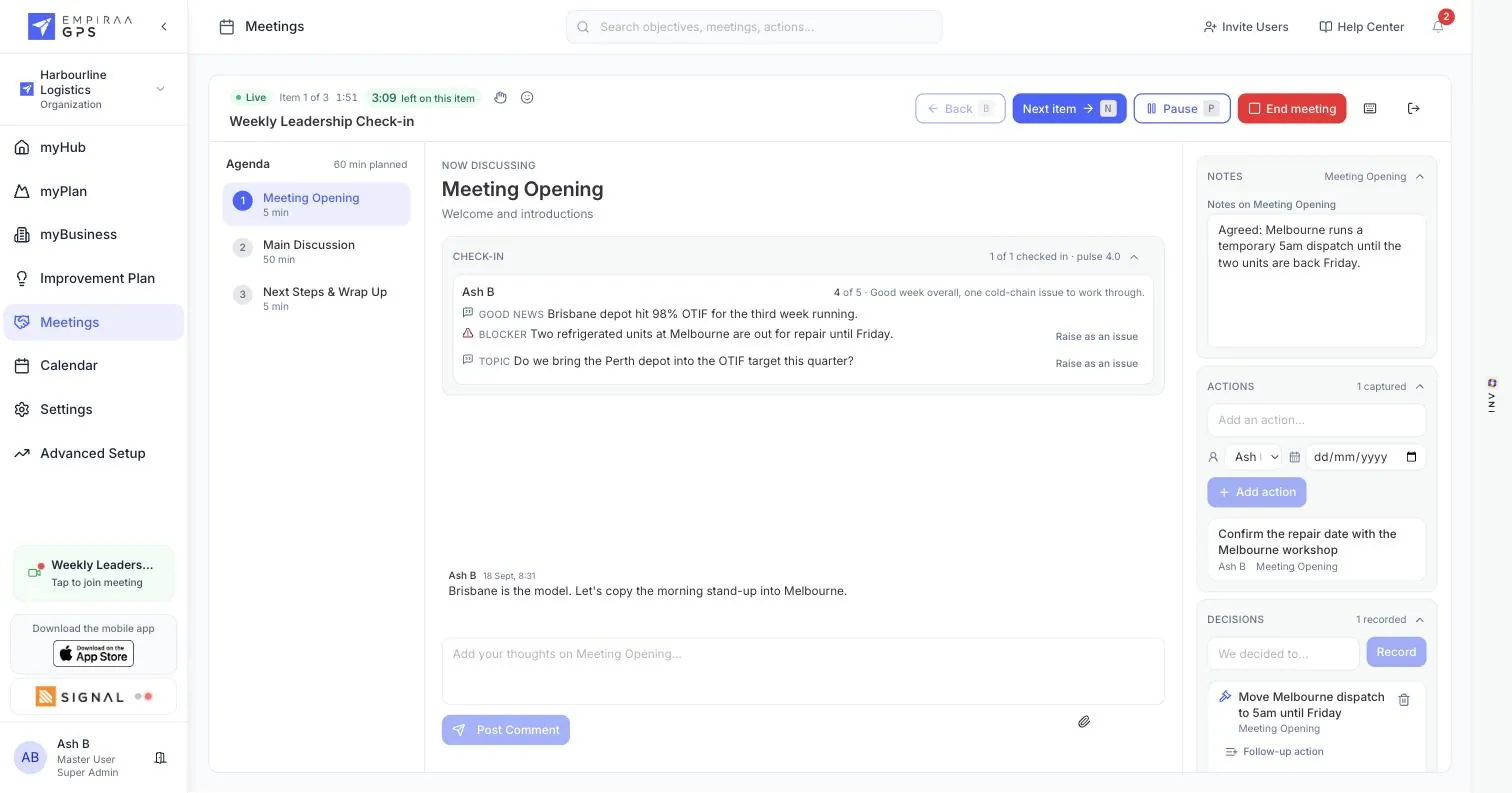
Open a meeting before it starts and everyone checks in: whether they are coming, how their week is going, their headlines and their blockers. The agenda is timed, issues are voted on, and questions have a home.
Inside a meeting
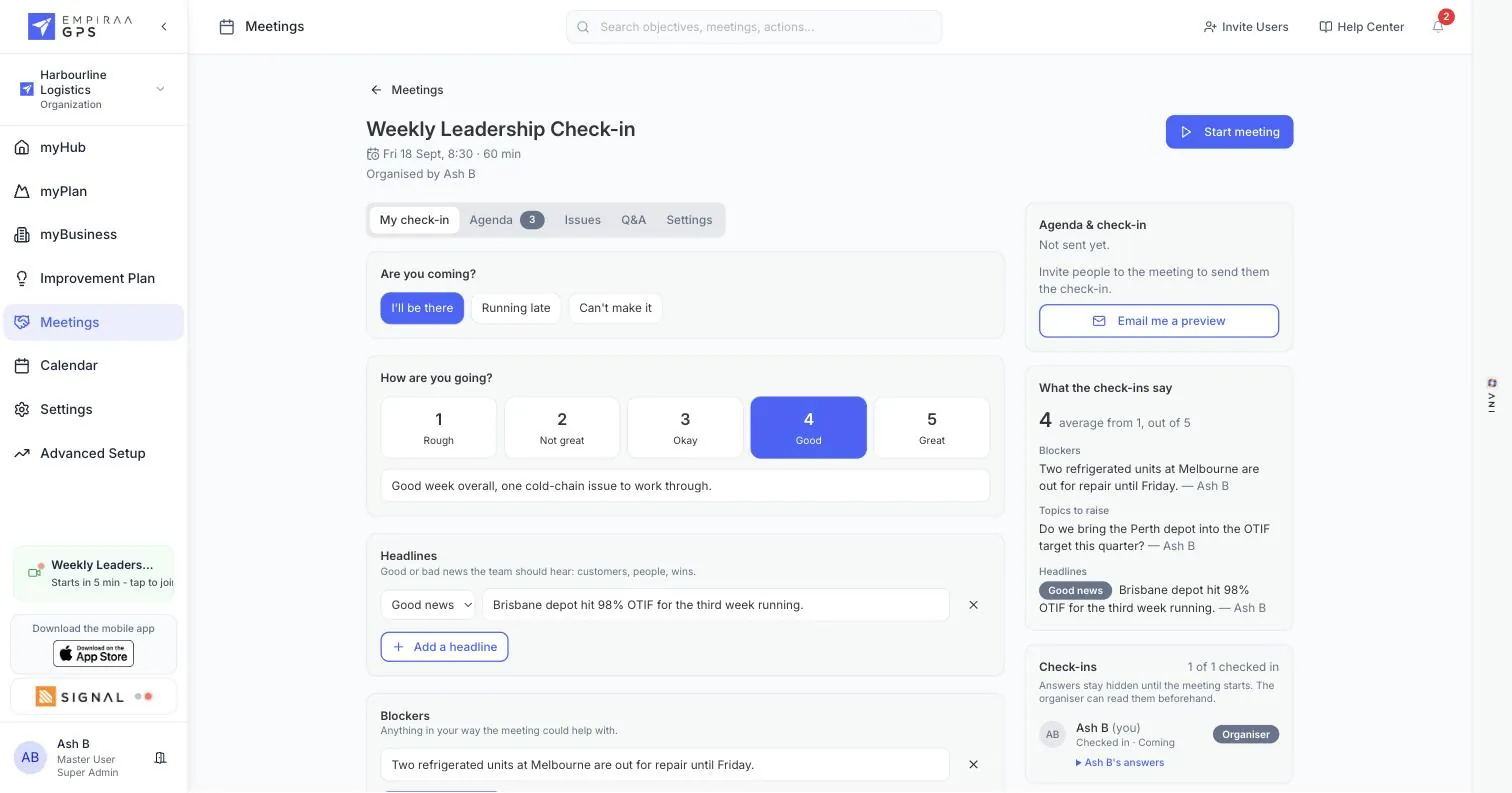
My check-in: Attendance, how the week is going out of five, headlines and blockers.
What leadership teams use it for
- The day beforeEveryone checks in, so the leadership team walks in knowing the blockers.
- Setting the hourTime each agenda item, and see the minutes planned against the hour booked.
- Deciding what mattersRaise issues, vote on which to take first, and park the rest.
Everything in a meeting
- Check in with attendance: I’ll be there, running late or can’t make it
- Rate how the week is going, one to five
- Headlines: the good and bad news the team should hear
- Blockers: anything in the way the meeting could help with
- Answers stay hidden until the meeting starts, except for the organiser
- Email everyone a preview of the agenda and check-in
- See who has checked in, and who has not
- A timed agenda, with comments on each item
- Minutes planned against the time booked
- Raise issues, vote on which to take first, or park them for later
- Carry open issues into the next meeting
- Q&A for the questions people bring, with or without a name on them
- Choose which check-in questions to ask, and who reads the answers
- Start the meeting when everyone is in
- A live view with a timer on each item and the check-in in front of you
- Discuss an item in comments while it is on the clock
- Record decisions as you make them
- Capture actions with an owner and a due date without leaving the meeting
- Raise a blocker or a topic from the check-in as an issue
- An ANI summary with key points when the meeting ends
- Upload a transcript from Otter, Fireflies or another AI note-taker
- Schedule the follow-up and email the summary
Calendar
The plan and the diary in one view.
Objectives, actions and meetings by day, beside your own calendar events, plus a Gantt chart of the plan and a dashboard of what is due.
Tabs in Calendar
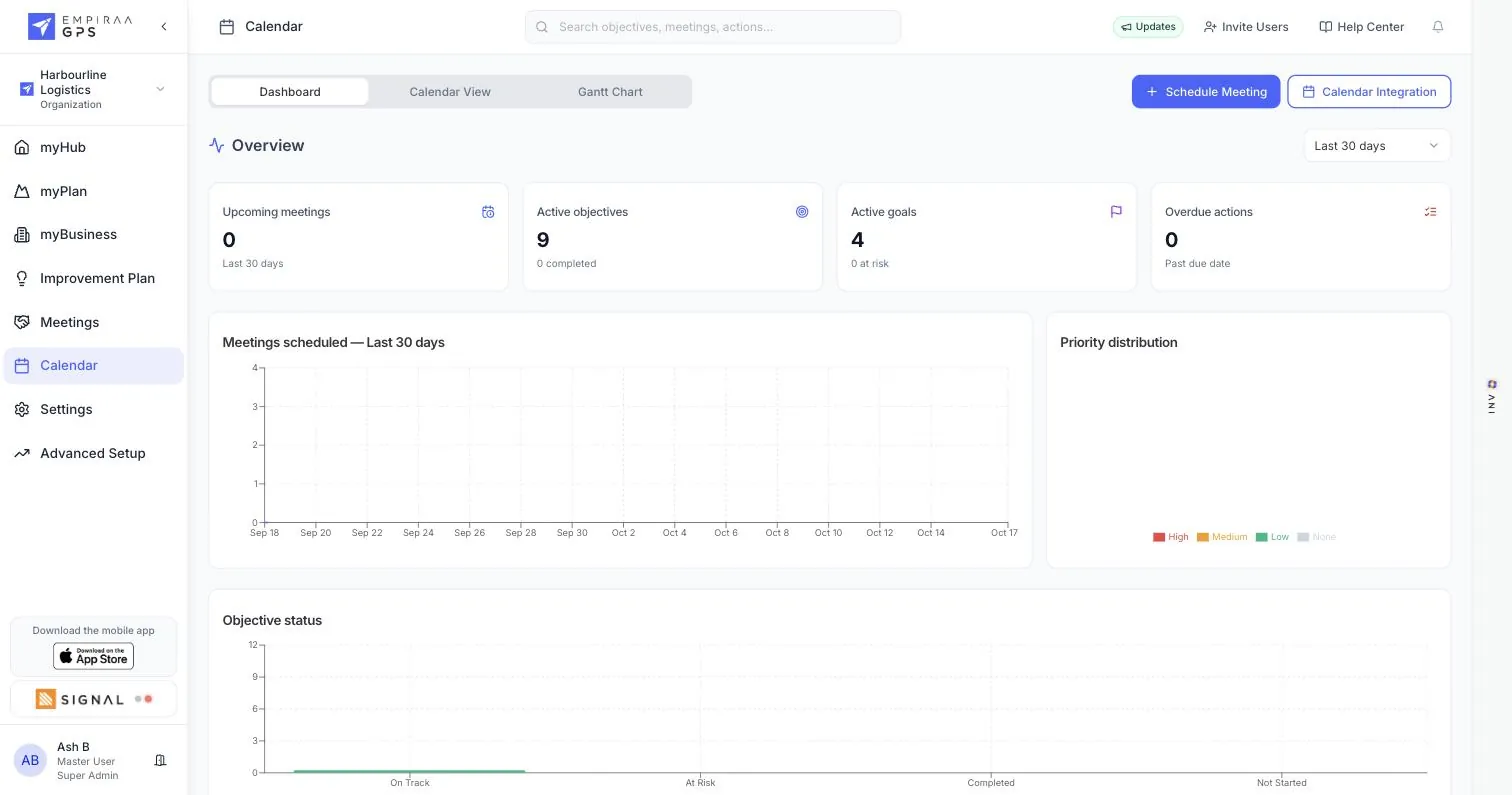
Dashboard: What is due, what is booked and how the plan is tracking.
What leadership teams use it for
- Planning the weekSee what is due and what is booked in one place.
- Spotting a crunchFind the week where three objectives fall due together.
- One diarySync with Microsoft 365 or Google Workspace and keep working in your own calendar.
Everything in Calendar
- Objectives, actions and meetings by day
- Filters for type, priority and status
- Your own calendar events alongside the plan
- Gantt chart of the plan
- Dashboard: upcoming meetings, active objectives, active goals and overdue actions
- Meetings scheduled over time, priority distribution and objective status
- Calendar integration with Microsoft 365 and Google Workspace
Improvement Plan
Ideas from the front line, turned into strategy.
A board where anyone can put up an idea, and a dashboard that shows which ideas have support and how many have become part of the plan.
Tabs in Improvement Plan
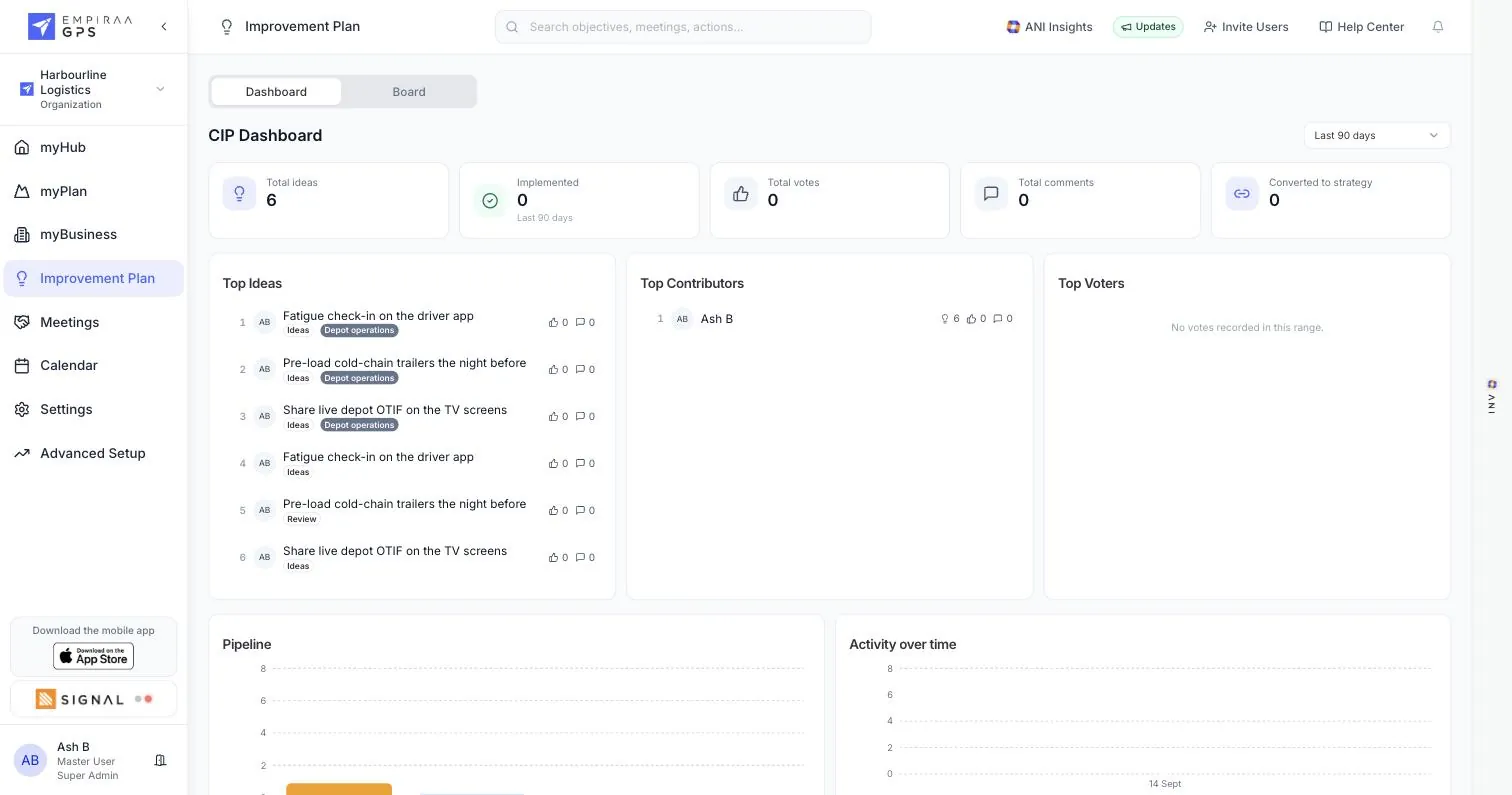
Dashboard: Ideas, votes, comments and how many became strategy.
What leadership teams use it for
- Continuous improvementCollect ideas from every site, not just the leadership team.
- Deciding togetherVotes and comments show which ideas the business is behind.
- Closing the loopMove an idea from review to implemented where everyone can see it.
Everything in Improvement Plan
- Ideas from anyone in the business
- Votes and comments on every idea
- Columns from idea and review through to implemented
- Tags on ideas, with a tag breakdown
- Dashboard: total ideas, votes, comments and ideas implemented
- Ideas converted to strategy
- Top ideas, top contributors and top voters
- Pipeline and activity over time
- ANI insights on the ideas board
ANI
An AI strategist in every screen.
ANI sits in a panel beside the plan. It reads every update in your workspace, flags what needs action, answers questions, drafts reports and builds the plan with you.
What leadership teams use it for
- Monday triageSee the objectives that need action this week, in order, with suggested next steps.
- Building a planAnswer ANI’s questions and it drafts goals, objectives and actions for review.
- Straight answersAsk what is off track and why, and get an answer from your own data.
Everything in ANI
- Insights that rank the objectives needing action
- Suggested next steps for each one
- Ask ANI anything about your strategy, objectives or team
- Quick prompts for common questions
- Build goals, objectives and actions in a guided flow
- Check whether the Accountability Chart is balanced
- Meeting summaries and report drafts for your review
- Your data is never used to train public AI models
Integrations
Your numbers, arriving on their own.
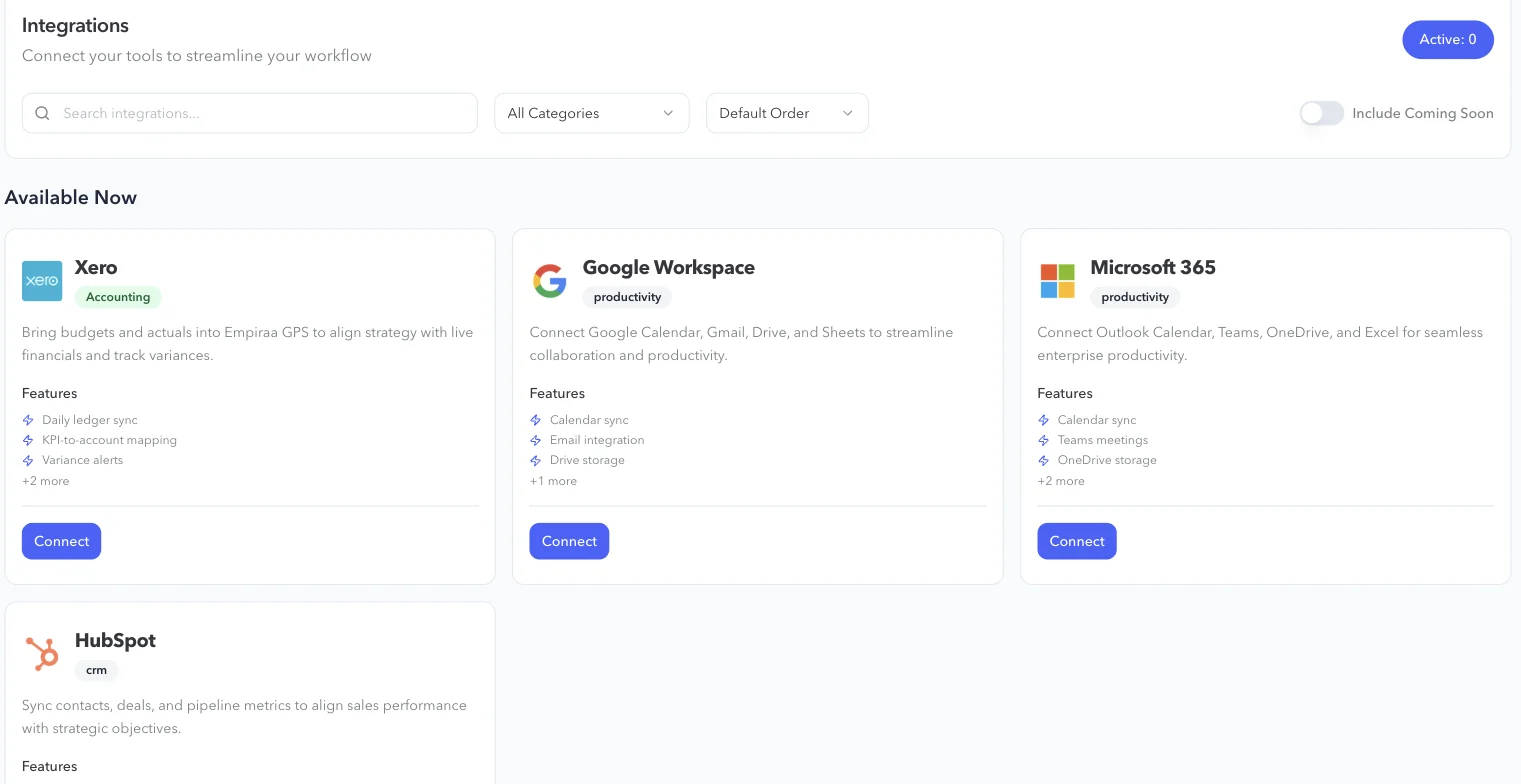
Connect finance, sales and calendars, work on the plan from Claude, or send values in from your own systems through the API.
What leadership teams use it for
- Financial KPIsMap a measure to your Xero accounts and stop rekeying figures.
- Pipeline goalsBring HubSpot pipeline metrics into the plan.
- Your own systemsPush actuals in through the API, and react to changes with webhooks.
Everything in Integrations
- Xero
- HubSpot
- Microsoft 365, including Teams meetings
- Google Workspace
- Connect GPS to Claude
- REST API and webhooks, with scoped keys
- Integrations tab on each objective
Prefer to click through it in order? Take the GPS tour.
By the job to be done
Start from the problem you need to fix.
Every feature exists to move a plan forward. These are the jobs leadership teams bring to GPS.
Common jobs
Strategic alignment
Every team, site and leader working to the same plan.
See strategic alignmentThe plan after the offsite
Turn the plan you agreed into owned goals and actions.
See strategic planningLeadership meetings
A weekly rhythm that ends in decisions and owned actions.
See meetings and check-insBoard reporting
Board and leadership reports written from live data.
See board reportingLeaving spreadsheets
Move the plan out of a spreadsheet few people open.
Compare GPS and spreadsheetsIdeas from the front line
Collect ideas from across the business and move the best into the plan.
See the Improvement PlanPlan
Turn the plan you have into goals people own.
Planning features
Start from the plan you have
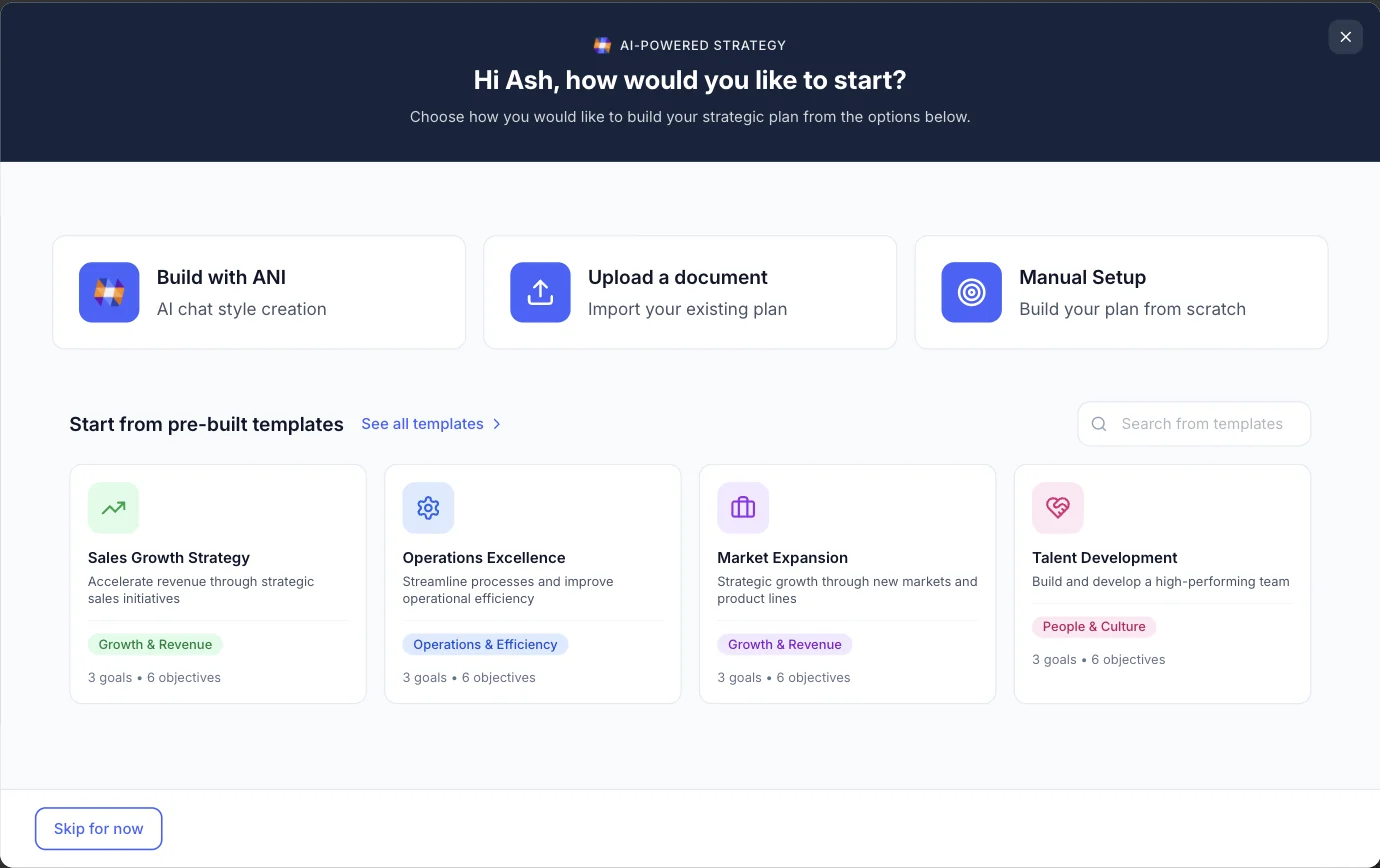
Upload your existing strategy, start from a template, or build it with ANI in a guided conversation. GPS turns it into goals, objectives and actions, each with one owner.
- Document upload
- Strategy templates
- Guided plan building with ANI
Your strategy on one page
Vision, values, goals and objectives with live status, in front of everyone who works on the plan. Export it to PDF for the offsite or the board pack.
Goals, objectives and KPIs
Every objective shows progress against where it should be today, with its actions, notes, files and history in one place.
- KPIs, OKRs, quarterly Rocks or your own method
- Progress measured against expected pace
- Actions with owners, due dates and priorities
Run
Give every priority an owner and a weekly rhythm.
Accountability and meetings
The Accountability Chart
See who owns what, not just who reports to whom. Vacant roles and overloaded leaders are flagged before they stall the priorities that depend on them.
- Owners, departments and open roles
- Overload flags
- Ask ANI whether the chart is balanced
Meetings and check-ins
Owners share good news, blockers and topics before the meeting. The meeting runs from a timed agenda, decisions and actions are captured as they happen, and ANI writes the summary.
- Agenda templates
- Live check-ins
- Issues raised and voted on
- Decisions and actions captured in the meeting
- AI meeting summaries
- Calendar sync
Report
See what is on track every week, and report in minutes.
Status and reporting
The timeline
Every goal and objective across the year, by week, month, quarter or year. The today line shows where each one should be by now.
Board and leadership reports
Pick one of six report types, a period and a tone. GPS writes the report from live data. Edit it like a document, save versions, then export or email it.
Improve
An AI strategist in the plan, and ideas from the whole business.
ANI and the Improvement Plan
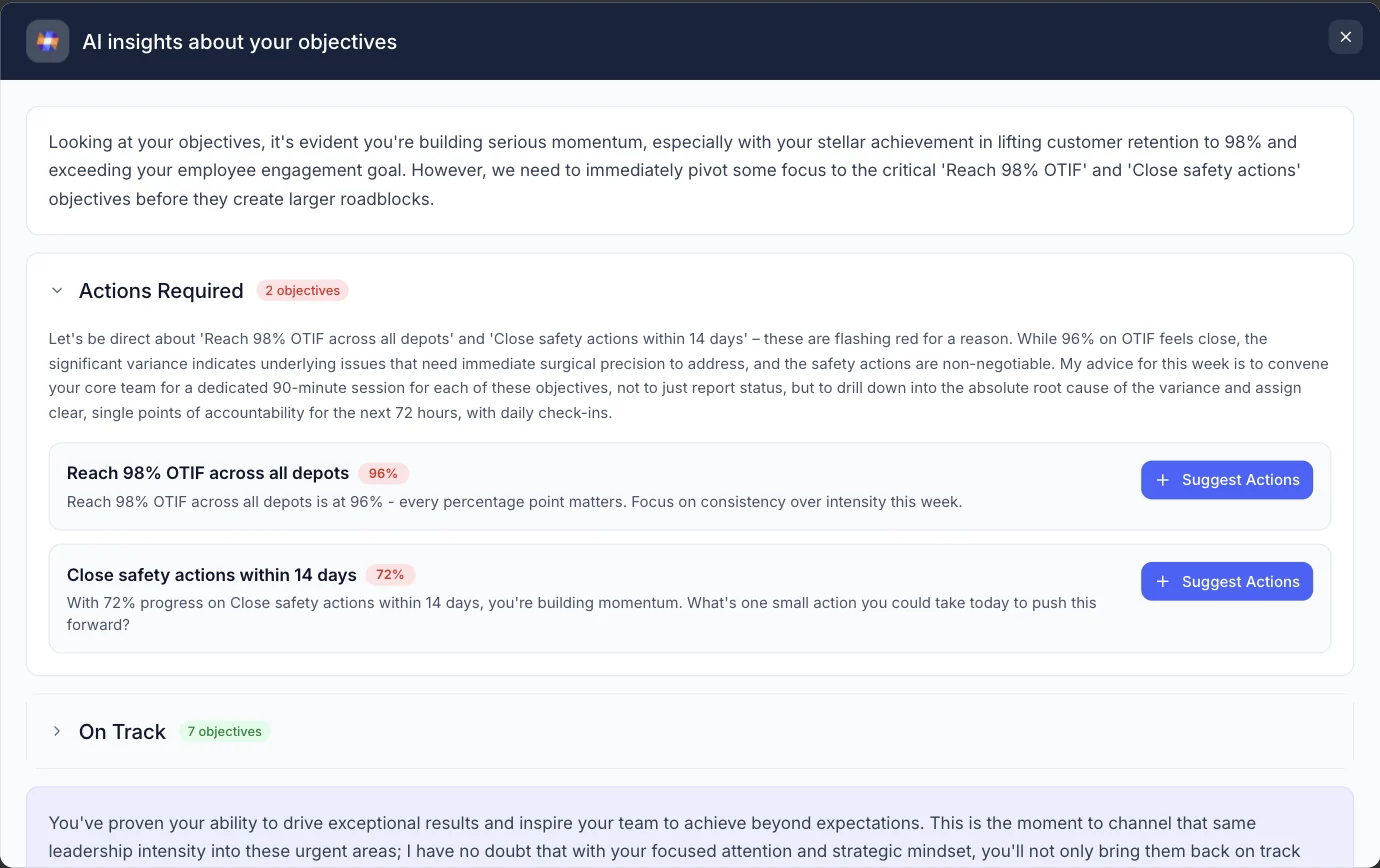
ANI, the AI strategist
- Builds and updates the plan with you
- Flags stalled and off track priorities
- Checks the load on your leaders
- Drafts summaries and reports for your review
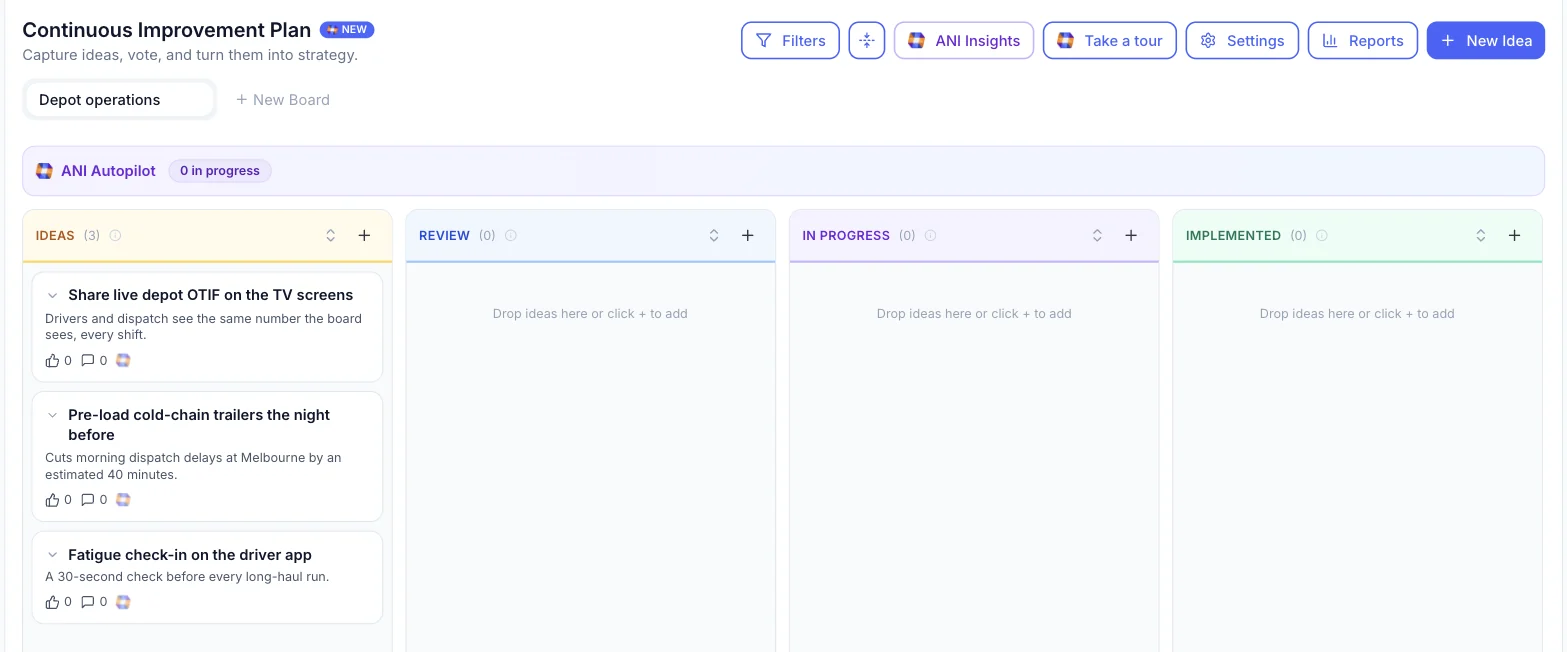
The Improvement Plan
- Collect ideas from across the business
- People vote and comment
- Ideas move from review to implemented
- The best become goals
Connect
Works with the systems you already run.
Integrations
Connect your numbers to the plan
Bring financial, sales and calendar data into GPS so progress reflects what is really happening in the business.
- Xero
- HubSpot
- Microsoft 365
- Google Workspace
- API and webhooks
- Connect GPS to Claude
Also on every plan
- Unlimited users
- iPhone app
- Branding Kit: your logo, colours and font
- Private goals and objectives
- PDF export
Next steps
Everything you need to decide.
Feature by feature
Strategic planning
Bring the plan you have, or build it with ANI.
Learn moreGoals and KPIs
Objectives measured against where they should be today.
Learn moreAccountability Chart
See who owns what, and who is overloaded.
Learn moreMeetings and check-ins
A weekly rhythm that ends in owned actions.
Learn moreTimeline
Every goal across the year, against today.
Learn moreBoard reporting
Six report types, written from live data.
Learn more
ANI in GPS
The AI strategist built into your plan.
Learn moreImprovement Plan
Ideas from the whole business, turned into strategy.
Learn moreBefore you buy
Questions
Feature questions, answered.
Can we bring our existing strategic plan into GPS?
Yes. Upload your existing plan, start from a template, or build it with ANI in a guided conversation. GPS turns it into goals, objectives and actions with owners.
Does GPS work with the planning method we use?
Yes. GPS tracks KPIs, OKRs and quarterly Rocks, and works with balanced scorecards or your own approach.
What does ANI do in GPS?
ANI is the AI strategist built into GPS. It helps build the plan, flags priorities that are stalled or off track, checks the load on your leaders, summarises meetings and drafts reports for your review.
Which systems does GPS connect to?
GPS connects to Xero, HubSpot, Microsoft 365, Google Workspace. There is also an API and webhooks for your other systems, and you can connect GPS to Claude. See integrations.
Where does the plan itself live?
In myPlan. It holds the Strategy One Pager, the timeline, the Next 90 Days priority board, your vision and culture, and the executive report generator. See strategic planning.
What is the Next 90 Days board?
A view of the quarter as a priority board. Goals, objectives and actions due in the next 90 days sit in high, medium, low and no priority columns, and the team drags them to agree what matters most.
Is there a mobile app?
Yes. There is an iPhone app for updates and check-ins on the go.
Can GPS carry our branding?
Yes. Add your logo, colours and font in the Branding Kit, so GPS looks like your business.

Question not answered here? Ask ANI and get a straight answer.
See every feature on a plan like yours.
Start for free and bring your goals, people and progress into GPS.