Empiraa

Board and leadership reporting

Board reports written from live data. In minutes, not days.

Empiraa GPS writes board and leadership reports straight from your live plan. Pick a report type, a period and a tone, and GPS drafts it for you to edit, save, export or email.

  • Set up with your plan
  • Unlimited users
  • 30-day pilot
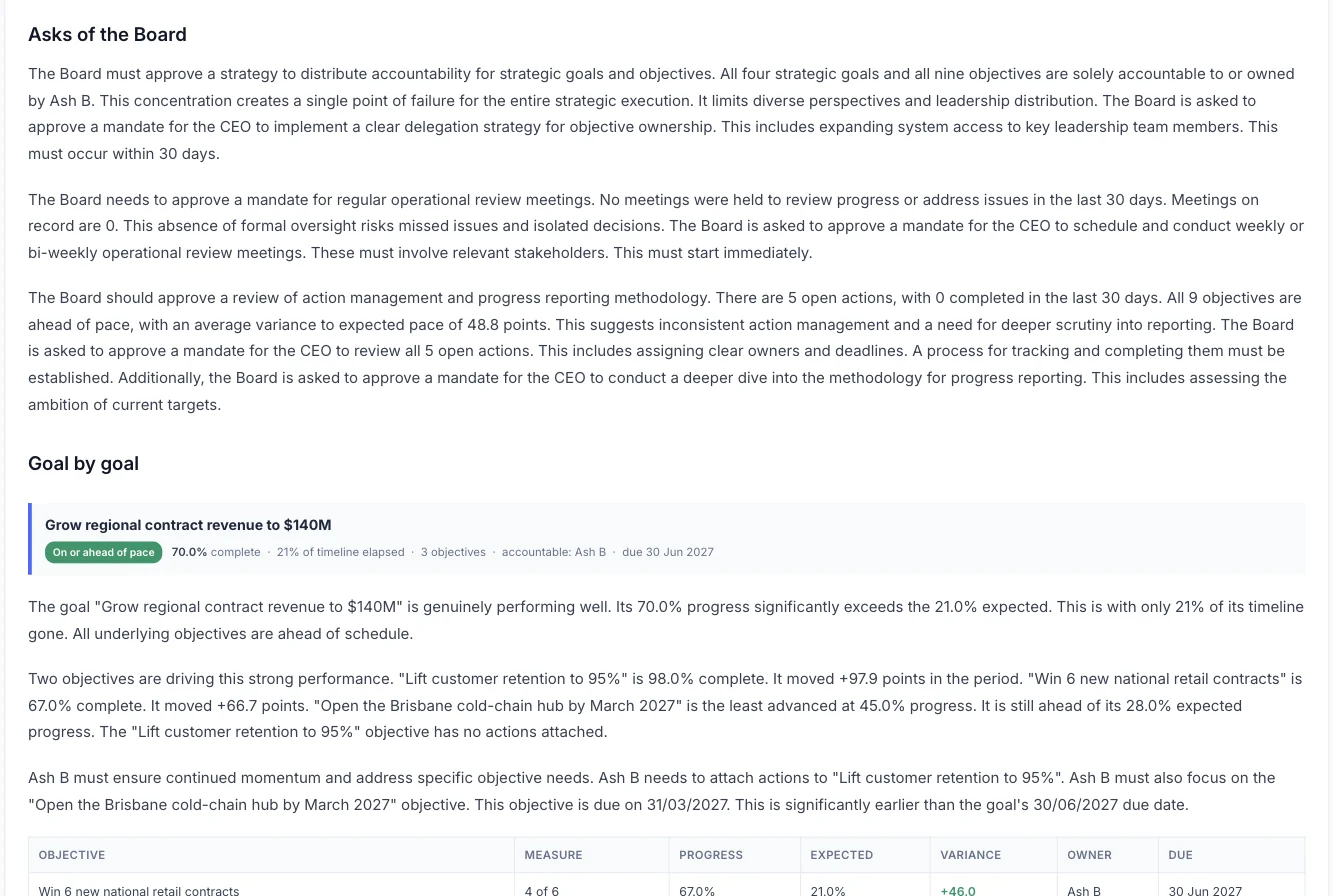
An Empiraa GPS board report showing the asks of the board, followed by a goal-by-goal review

Why reporting hurts

The report pack eats days your leaders don’t have.

Most leadership teams rebuild the same pack every month or quarter. By the time the board reads it, it describes last month.

Where the time goes

Chasing updates

Someone emails every owner, waits, then chases again.

Copying numbers into slides

Figures move from spreadsheets into a deck by hand, and errors come with them.

Softened status

Updates written by the people being measured tend to look better than the plan does.

Try it

Build a report from a demo plan.

Pick a report, a period and a tone, then press Generate. This is the structure GPS writes from a live plan.

Six report types. Edit it like a document, save versions, then export or email it.

Board report · Demo workspace: Harbourline Logistics · This quarter

Report to the Board

Summary

Two of four goals are on pace. Revenue and the leadership bench are ahead of plan. On-time delivery and safety are behind, and both need a decision this month.

Performance against plan

  • Grow regional contract revenue to $140MOn pace
    70% complete, 68% expected by now
  • Build the leadership benchOn pace
    85% complete, 80% expected by now
  • Deliver 98% on-time, in-full across every depotBehind
    80% complete, 88% expected by now
  • Zero harm: bring LTIFR below 2.0Behind
    80% complete, 86% expected by now

Risks requiring board attention

  • On-time, in-full delivery is at 94.2% against a 98% target. Two depots account for most of the gap.
  • Safety actions closed within 14 days are at 72%.
  • One General Manager role is vacant while the cold-chain hub is 45% complete.

Asks of the board

  • Endorse the depot recovery plan for delivery, with a review in November.
  • Note the interim owner for the cold-chain hub.
Scripted example from a demo workspace. In GPS, the report is written from your own plan.

How it works

From live plan to finished report in four steps.

The steps

  1. Choose the report

    Pick one of six report types.

  2. Set the period, tone and length

    Choose the time period, how it should read and how long it should be.

  3. Generate from live data

    GPS writes it from your goals, objectives, owners and progress, with a goal-by-goal review, charts and summary tables.

  4. Edit, save and send

    Edit it like a document, save versions, then export or email it.

Report types

Six reports for the questions leaders ask.

The six report types

Strategy progress

How each goal is tracking against where it should be today.

Execution and accountability

Who owns what, open and overdue actions, and where ownership needs to change.

Engagement and alignment

Check-in completion, engagement goals and the ideas teams have raised.

Financial and forecast alignment

Financial goals and the forecast, side by side with the plan.

Risk and opportunity

The risks to the plan, and the places to push harder.

Board report

Performance against plan, the risks that need the board’s attention, and the asks of the board.

Inside a report

What your board or leadership team actually reads.

Report sections

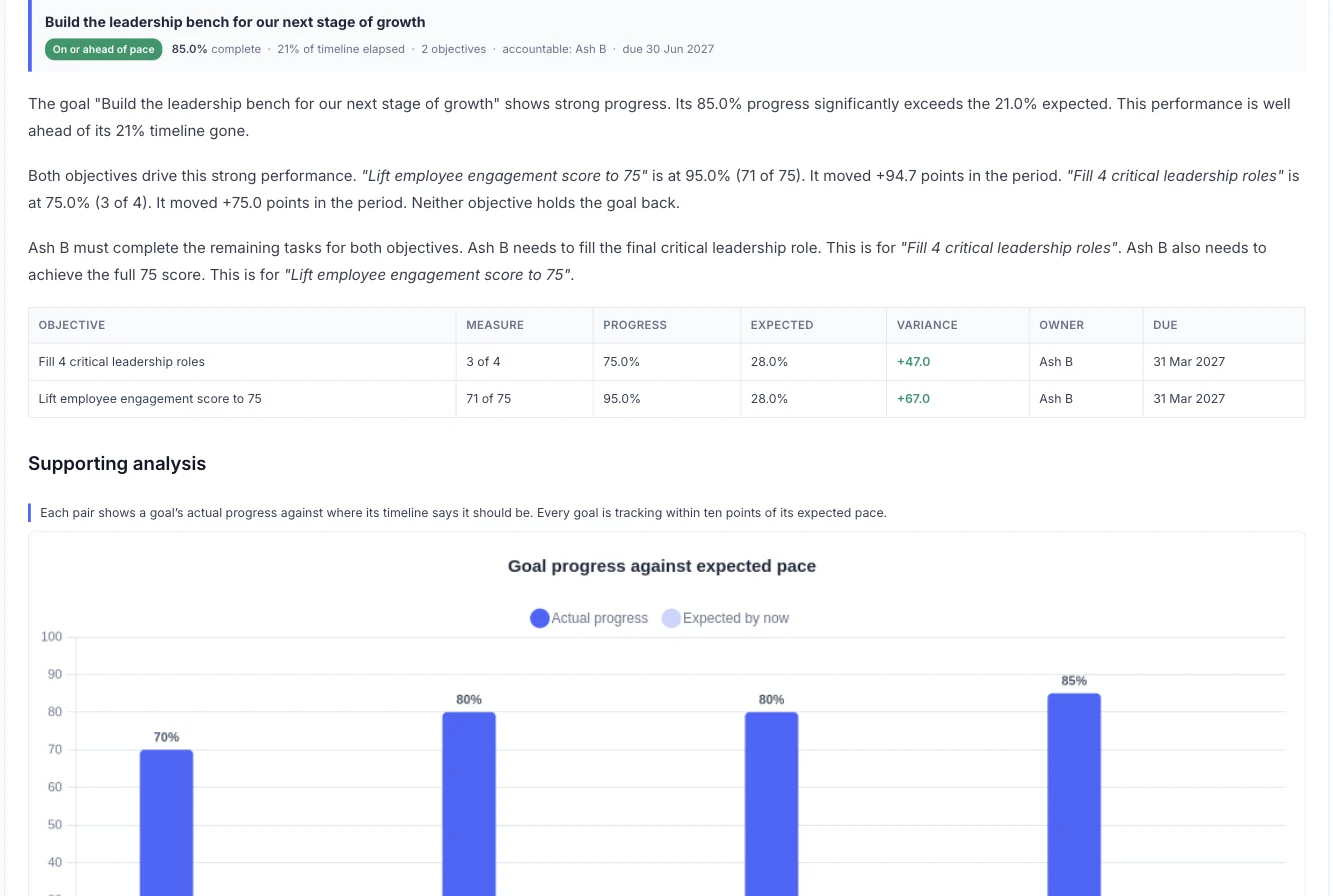
A goal-by-goal review

Each goal gets its progress, its variance against where it should be today, the objectives behind it and who owns them.

A goal in an Empiraa GPS report with its objectives, measures, progress, expected progress, variance, owner and due date

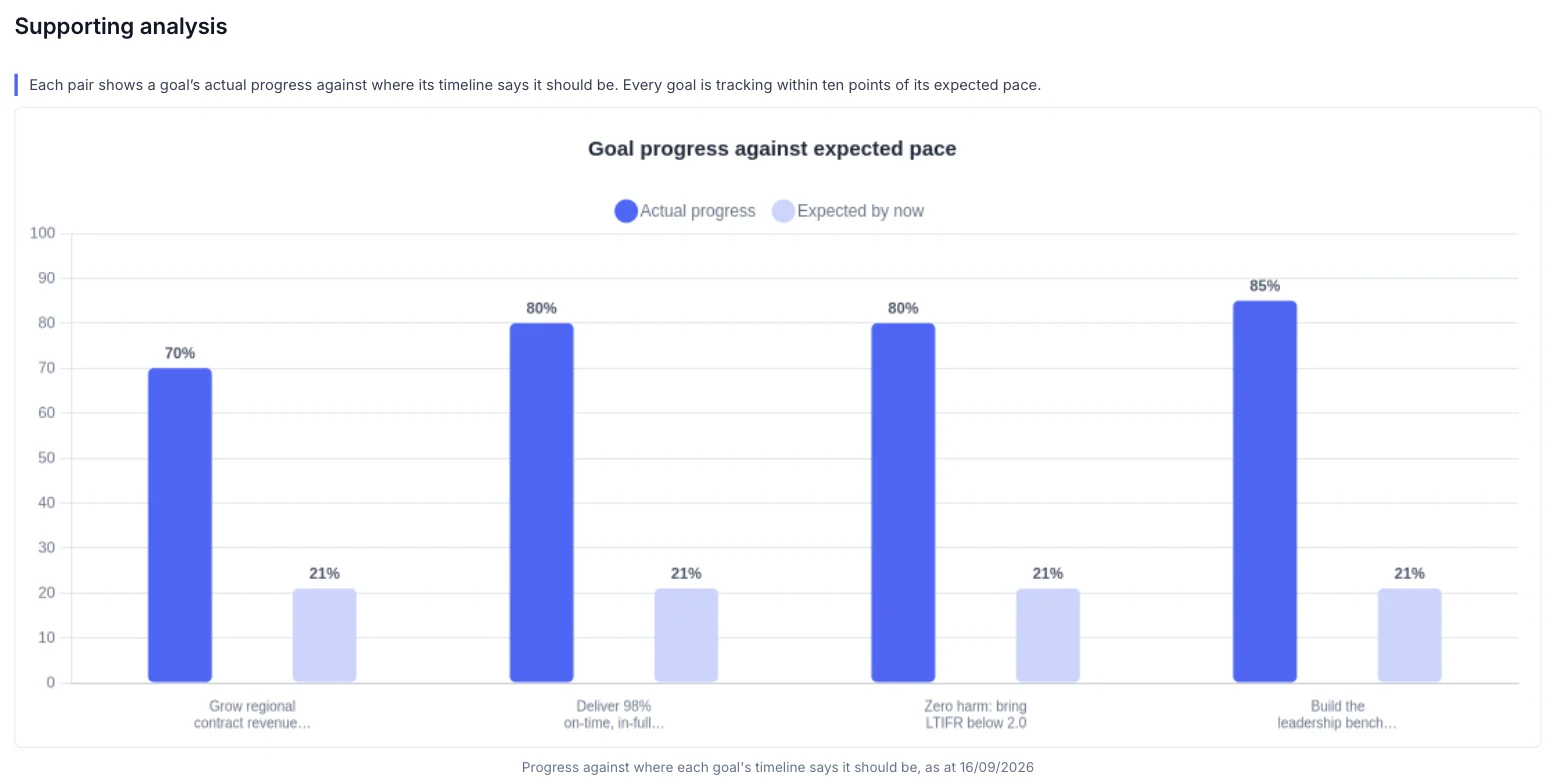
Charts that show the gap

Actual progress against expected pace for every goal, so the gap is clear at a glance.

A chart in an Empiraa GPS report comparing each goal’s actual progress with where it should be by now

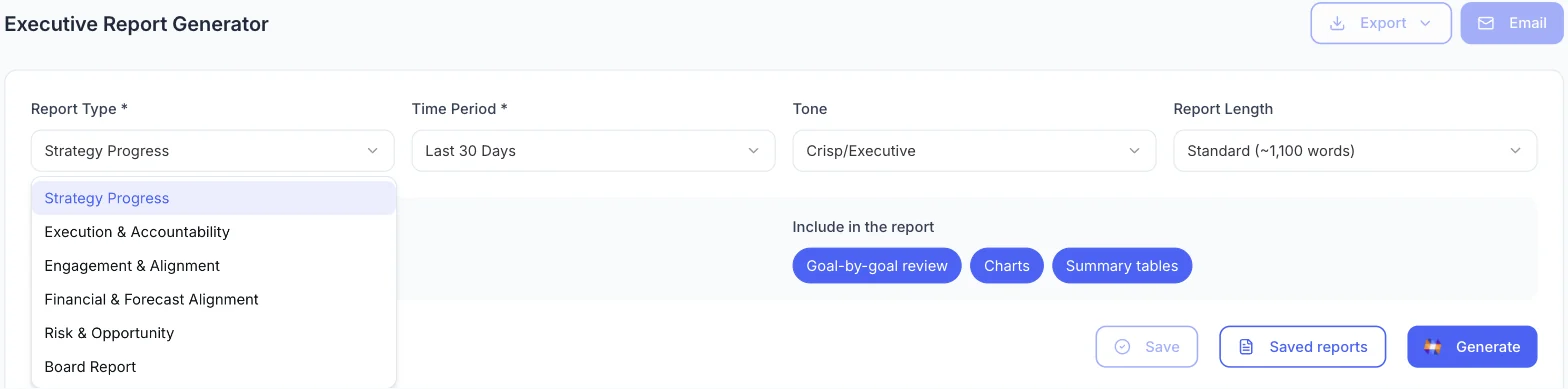
You choose what goes in

Set the report type, period, tone and length, then pick the sections: the goal-by-goal review, charts and summary tables. Board reports finish with the asks of the board.

The Empiraa GPS report generator with report type, time period, tone and length, and the sections to include

Who it’s for

One report, read three ways.

By role

CEO or MD

Walk into the board meeting with numbers from this week, not last month.

CFO

Put financial goals and the forecast next to the plan they fund.

Owners and boards

See the gaps as well as the wins, with the decisions you need to make.

Questions

Reporting questions, answered.

Can we edit a report before it goes out?

Yes. GPS drafts the report for you. Edit it like a document, save versions, then export or email it.

Which report types are there?

There are six: board report, strategy progress, execution and accountability, engagement and alignment, financial and forecast alignment, and risk and opportunity.

Where does the report data come from?

From your live plan in GPS: your goals, objectives, actions, owners and progress against the timeline.

Can we choose the tone and length?

Yes. Choose the tone and the length before you generate, and pick which sections to include, such as the goal-by-goal review, charts and summary tables.

Do we need a board to use it?

No. The same reports work for owners, investors, a parent company or your own leadership team.

How long does a report take?

Minutes. GPS writes the draft from live data, so the time goes into reviewing it, not rebuilding it.

Question not answered here? Ask ANI and get a straight answer.

See your next board report written from live data.

Book a 15-minute demo and we will build one from a plan like yours.

15-minute demo

See GPS on a plan like yours.

  • Your strategy as goals with owners and live status
  • A board or leadership report written from live data
  • How ANI flags priorities before they stall

No preparation needed. Bring your questions on rollout, security and pricing.