

Daily Spark
New prospects in your inbox, before you open the CRM.
A standing search against your ideal customer profile. It runs overnight and emails you the companies it found, so the day starts with names rather than a blank screen. On by default, on every plan.
14 days free. No credit card.
- 14 days free
- No credit card
- Unlimited users
 Empiraa SignalTuesday, 6:00am
4 new companies match your ideal customer
Commercial sites in Sydney running plant over fifteen years old
Corelands Facilities Group
Why it matched
Chiller plant listed at 2006 on their own site
Facilities Manager, Head of Property
Brightwater Cold Storage
Why it matched
Refrigeration across two warehouses, no service partner named
Operations Manager
Kestrel Industrial Park
Why it matched
Six tenancies on one shared plant room
Centre Manager, Head of Property
Halden Trade Centre
Why it matched
Listed a maintenance coordinator role three weeks ago
General Manager
An example of the morning email. The companies shown are invented.
The problem
Prospecting is the first thing dropped in a busy week.
Not because anyone decides to stop. Because it is the only part of the job with no trigger.
Why the top of the funnel empties
A search you have to remember to run
Every deal, every meeting and every invoice arrives with a prompt attached. Finding new companies does not. It waits for someone to choose it over something urgent, and on a bad week nobody does.
It goes quiet for weeks before it hurts
An empty top of funnel costs you nothing today. It costs you a quarter in three months, by which point the cause is too far back to connect to the effect.
The tools sit in a different tab
If the list lives in a data tool and the pipeline lives in the CRM, prospecting is a context switch. Context switches are what get skipped.
How it works
You describe the customer once. It keeps going.
Three things happen without you opening anything.
The standing search
Set the profile once
Daily Spark reads the same ideal customer profile the rest of Signal uses. Geography, industries, company size and the job titles that sign things off. Write it in plain words once and the standing search is configured.
- The same profile drives Prospect Spark, ANI, decks and proposals
- Change it whenever your target market changes, and the next run follows
- No boolean strings and no filter maze to maintain
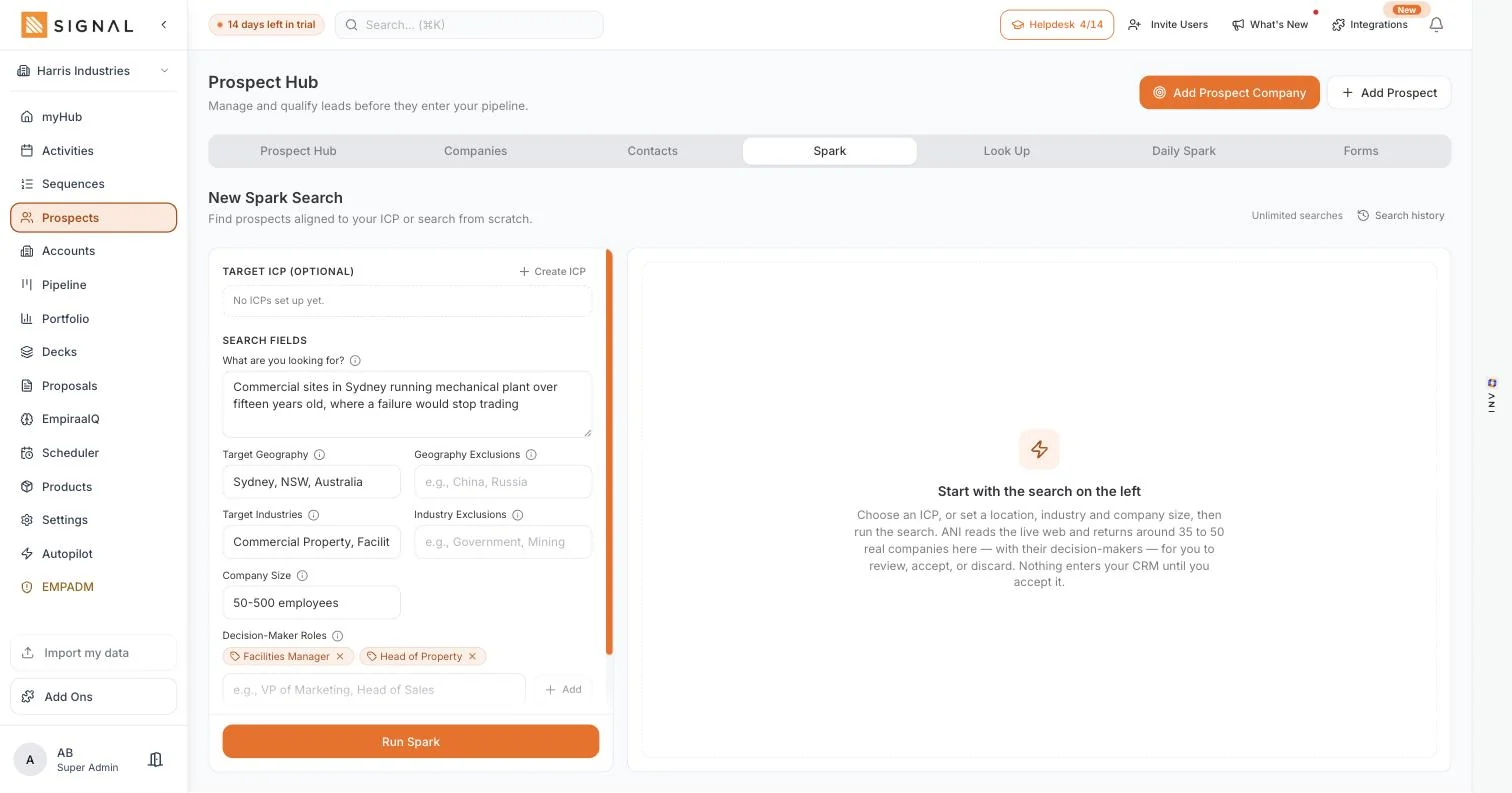
It runs overnight and emails you what it found
The search runs while you are not working and the result is in your inbox in the morning. That is the whole point of the feature: the prompt comes to you, so prospecting stops depending on somebody choosing it.
- On by default, on every plan, with nothing to configure
- Companies that match the profile and were not already in your workspace
- The decision-makers inside them, not just the company name
The companies wait in the app until you judge them
The email is the nudge. The prospects themselves sit in the Daily Spark tab in the Prospect Hub, so nothing is lost if you read the email on your phone and deal with it later. Accept the ones worth calling and discard the rest.
- Nothing enters your pipeline until you accept it
- Discards do not come back, so the search sharpens as you use it
- Accepted companies are one click from a sequence, a call or a booking link
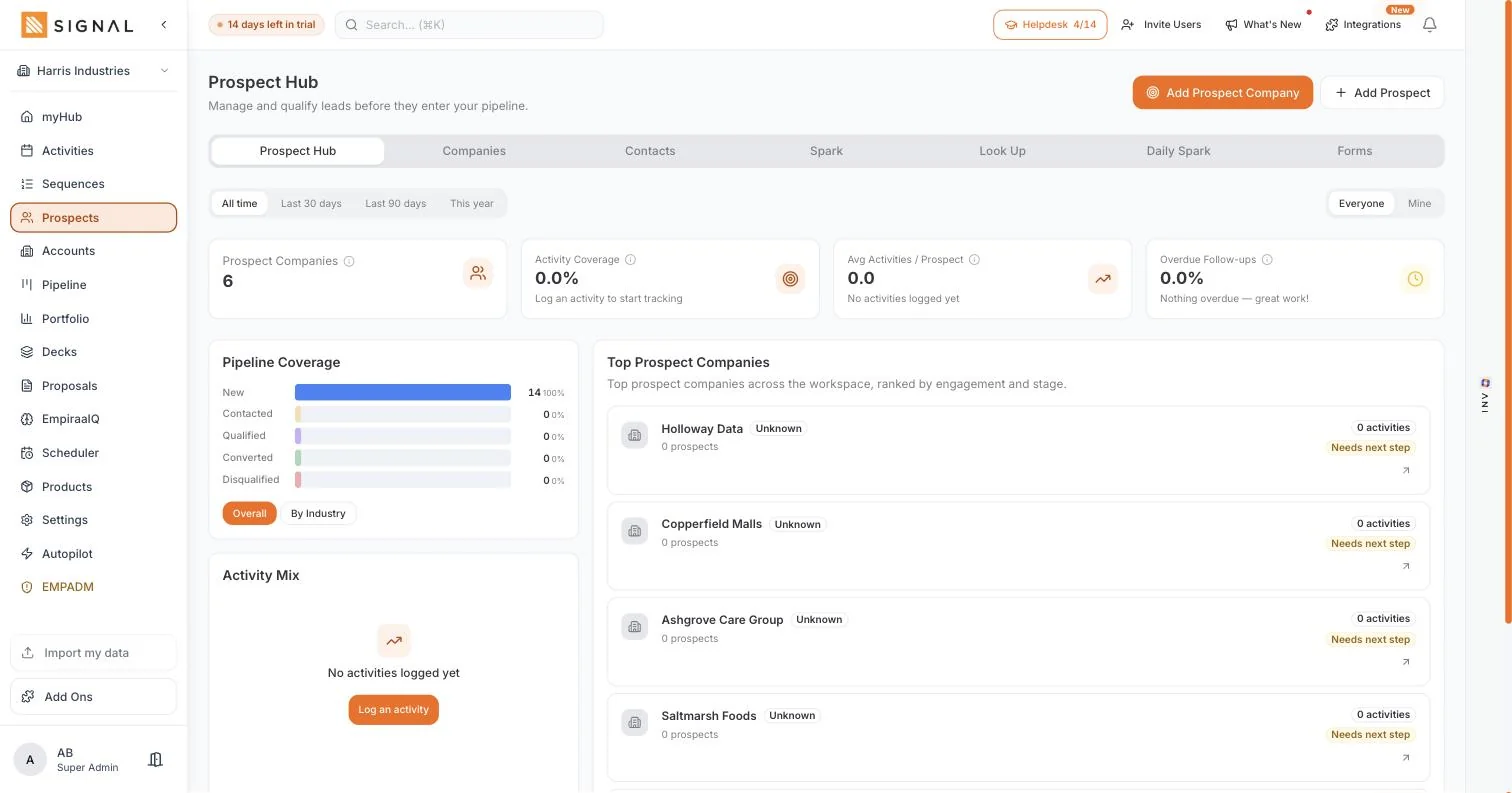
Every plan has every feature. The difference between them is volume.
Explore Signal freeWhat you get
A standing search, not a reminder to do one.
The difference matters more than it sounds.
In Daily Spark
On by default
It is running from your first afternoon. There is no add-on to buy, no credit to spend per prospect and no workflow to build first.
On every plan
Not a higher tier and not an upsell. The monthly prospect allowance differs by plan, but the standing search itself is on all three.
Net-new companies
Companies that were not already in your workspace. It is not a digest of your own records and it is not a list of who visited your website.
Unlimited users
Prospects are metered on the workspace rather than the person, so putting a second rep on it gives you another pair of hands and not another bill.
Review before anything lands
Accept or discard each company. Your pipeline stays a forecast rather than a dumping ground for whatever a search returned.
In the system you already sell from
Accept a company and the outreach, the follow-up, the deck and the deal are all right there. Nothing is exported and nothing is re-uploaded.
Getting started
Nothing to turn on.
The only real step is describing who you sell to.
Three steps
- 5 minutes
Describe your customer
A few sentences in plain words. You already know this, you have just never had to write it down.
- Overnight
Wait until tomorrow
The first run happens overnight. There is no button to press and no schedule to set.
- 10 minutes a day
Work the list
Open the email, accept the companies worth calling, and start the outreach from the same screen.
By role
What changes on a Monday.
The same feature lands differently depending on whose week it is.
Who feels it
A sales rep
The first thirty minutes stop being a decision. The list is already there, and it has a reason attached to each name.
Learn moreA sales manager
New pipeline creation stops depending on whether anyone felt like prospecting last week.
Learn moreA founder
You are the sales team and you have another job. This is the part of it that runs whether or not you get to it.
Learn moreA CEO or owner
You can tell the difference between a team creating new pipeline and a team recycling the same names.
Learn moreQuestions
Daily Spark questions, answered.
Does Daily Spark actually email me, or is it just a list in the app?
Both. The new companies are emailed to you each morning, and the same companies stay in the Daily Spark tab in the Prospect Hub so you can accept or discard them when you get to it. Reading it on your phone at breakfast does not lose you anything.
Do I have to turn it on?
No. It is on by default on every plan. The only thing it needs from you is an ideal customer profile, because that is what it searches against. Describe who you sell to and the first list arrives the next morning.
Is it on every plan or only the top one?
Every plan. The number of fresh prospects included each month differs by plan, starting at 2,000 on Launch, but the standing search and the daily email are on all three. See the plan limits.
Is this the same as a website visitor alert?
No, and the difference is the whole point. A visitor alert tells you which companies came to your website, which needs traffic you already have and tells you who turned up. Daily Spark brings you companies that match your profile and have never heard of you. Plenty of teams want both, and they are not substitutes. What other CRMs actually do.
What stops it filling my CRM with rubbish?
Nothing enters your pipeline until you accept it. The companies sit in the Prospect Hub as prospects, you accept or discard each one, and discards do not come back. The search gets sharper the more you use it.
Does every rep get their own?
Every plan includes unlimited users, and the prospect allowance is metered on the workspace rather than the person. So a second rep is another person working the list, not another subscription.
What if my target market changes?
Update the ideal customer profile and the next overnight run follows it. You are not rebuilding a saved search or rewriting filters, because the profile is the same one the rest of Signal reads from.

Question not answered here? Ask ANI and get a straight answer.
Tomorrow morning, start with a list.
14 days free. No credit card. Unlimited users from the first minute.