

The practice layer
Fourteen clients. One screen that knows which one to worry about.
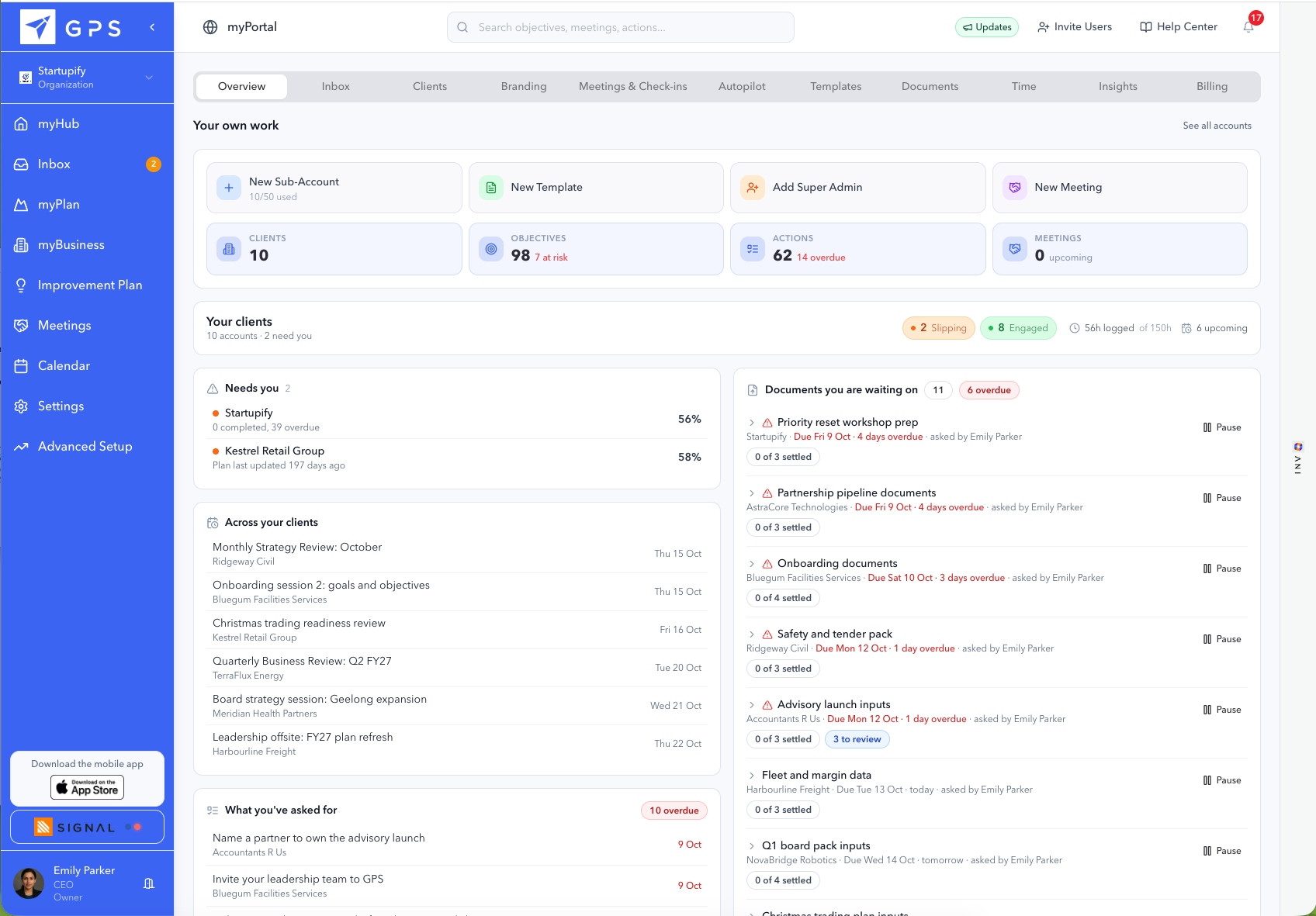
myPortal is not a client workspace with extra permissions. It is the layer above every client workspace, and its tabs are your practice rather than anybody’s plan: the book, capacity, your templates, your branding, your AI defaults, and what you are still waiting on from whom.
- A separate workspace per client
- Your branding in all of them
- Capacity twelve weeks ahead
Why the layer exists
Three things a practice needs that a single company never asks for.
This is the argument the walkthrough below demonstrates without making. Software sold to one business only ever has to show that business itself.
The three
A workspace shows one company. A book shows fourteen.
Client software is built for the company using it, so however many permissions you stack up you are still looking at one plan at a time. The question a practice asks every Monday is which of fourteen clients has gone quiet, and that is a different screen, not a filter.
The thing that goes wrong is silence, not failure
A client rarely tells you they have stopped. They stop updating, then they stop attending, then they do not renew, and the first two are invisible unless something is watching. Engagement, last activity and overdue objectives on one row is how a renewal conversation happens in week six rather than week twenty.
Your practice has to be in it, not just your clients
Who owns which account, how much of a retainer has been used, whether next month fits, what you are waiting on from whom. None of that is about a client plan, and all of it decides whether the practice makes money.
myPortal · The view across your clients
Run your client services from one place.
myPortal sits above your separate client workspaces. Explore every page to see how it helps you organise delivery, support your team and keep your clients moving.
 myPortal10 pages · Choose one to explore
Know which client needs you next.
See client engagement and progress together. Start your week with the conversations where your expertise can make a difference.
Focus your attention before a client slips further behind.
Actual myPortal product capture.
- Review engagement across clients
- Spot off-track plans
- See unallocated relationships
Your accounting and practice-management tools retain their own roles. Retainer hours support delivery reviews; GPS does not invoice your clients.
Your service, your approach
Your brand and expertise, built into the experience.
Set the workspace identity and ANI defaults that support a consistent client experience.
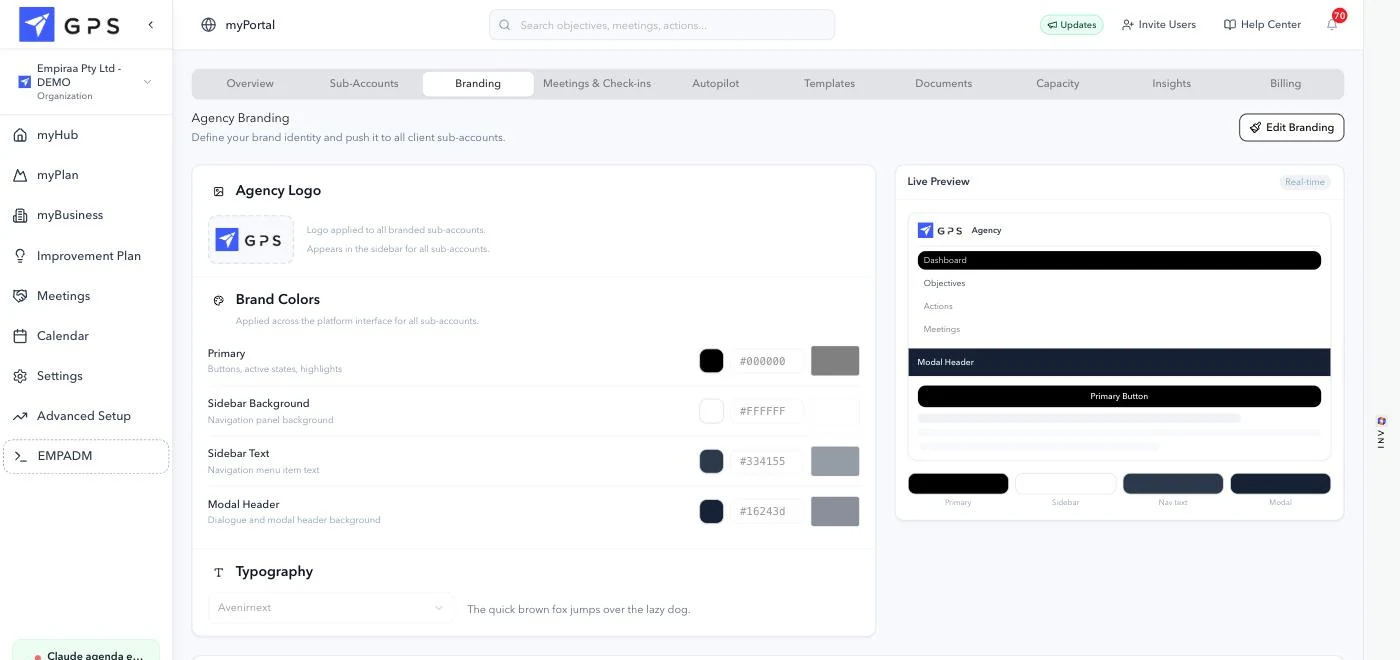
Your brand, and a live preview of it
The logo, four colour slots and the typeface, with a preview of a client workspace rendered in them beside the controls. Underneath, out of frame, is the button that applies the lot to every sub-account at once or to the ones you select.
What it is not is your own address. Clients sign in at ours with your brand inside, which is the one thing about white label worth knowing before you promise a client otherwise.
Your logo
Applied to every branded sub-account, and it appears in the sidebar of all of them.
Four colour slots
Primary, sidebar background, sidebar text and modal header. Those four are the whole interface.
Your typeface
Set once here, used across every client workspace.
A live preview
The client workspace rendered in your brand, updating as you change a slot.
How the AI behaves, set once for the whole book
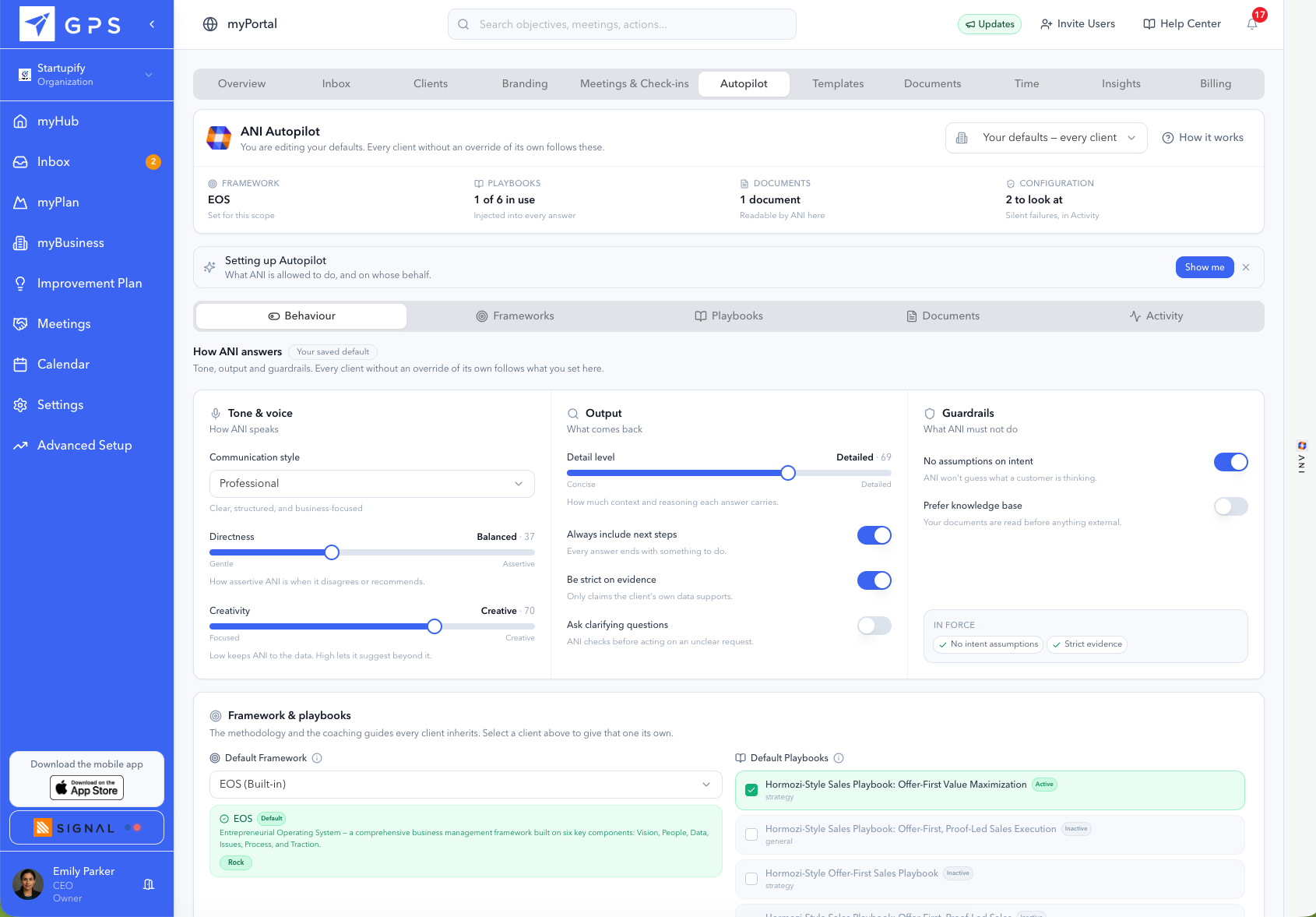
Communication style, directness and creativity on the left, what each answer carries in the middle, and on the right the things it must not do. Every client without an override of its own follows these, and the default framework and playbooks underneath are inherited the same way.
The guardrails are the part worth looking at. No assumptions on intent, strict on evidence, and prefer your own documents ahead of anything external, so what a client hears between your sessions sounds like your practice.
Work it out with your own numbers
Does the book you want actually fit?
Most practices answer this by finding out. Four inputs, and the rows below are the Capacity tab drawn against your own figures rather than a made-up practice's.
Client delivery only. Not selling, not admin, not your own firm.
Sessions, prep, the report, and chasing an update.
Your target book does not fit
22 clients
3 consultants at 14h a week is 182h a month, which is 22 clients at 8h each, 2 short of 24.
To fit 24 as you are
454m
per client, per month
Or hire
1
more consultant
Each consultant would carry
8.0
clients, at 64h a month
Every consultant is over their month by 3h. The book does not fit as allocated.
The only number on this page software can move is the third one, the minutes per client. At an hour less each, the same 3 consultants would fit 25 clients rather than 22. Whether an hour is realistic for your practice is your call, not ours: most of it goes on chasing an update and assembling a report, which are the two things that stop being work when the plan is live. We have not measured it for your kind of firm and we are not going to claim a figure we cannot stand behind.
Branding
Your logo in every client workspace.
The one feature in here with a page of its own, because white label has a question attached that deserves answering properly rather than in a caption.
Your logo, four interface colours and your typeface, set once and pushed into every client. The domain stays ours, which that page says at the top rather than at the bottom. What is yours and what is not.
Adding a client
Four fields, and the fourth is the one firms skip.
A sub-account takes a minute. The retainer is the field that turns the book from a list of clients into a picture of whether the practice is being run.
- One
Add the client as a sub-account
Their own workspace, separate from every other client and from yours. Nobody sees anybody else.
- Two
Assign the consultant who owns them
One name against the account, so an unallocated client is visible as an unallocated client rather than as a client everybody assumed somebody else had.
- Three
Tag them how your practice thinks
Retainer, strategic, renewal month, service line. Your words, and the book sorts and filters by them.
- Four
Set the retainer their time counts against
Hours logged against hours sold, per client, per month. Fifteen minutes into a four hour retainer is a client you have not served yet.
Then apply a plan. Your own template, or one of the 220 in the library, pushed into their workspace in one action. The fifteen named frameworks.
What it is not
It does not replace your practice management system.
Every firm that evaluates this arrives with one, or a shortlist of them, and the question underneath the whole demo is whether this replaces it. It does not, and knowing that early is worth more than finding out on the call.
It does not invoice your clients
There is no billing, no invoice, no WIP and no debtors. Time logged against a retainer tells you whether a client has been served, not what to charge them. Your accounting system keeps doing that job.
It is not practice management
No resourcing across projects, no utilisation reporting for the firm, no timesheets for payroll. Capacity answers one question, whether next month fits, and it answers it against allocated time and booked meetings rather than against a full resource model.
It is not a project tool
Deliverables with dependencies, a Gantt, files moving through review: that is project work and it belongs where you already do it. This holds the client’s plan and the rhythm around it, which is the part that usually has nowhere to live.
What it does hold
- The client’s plan: goals with measures, owners and dates, tracked against expected pace
- The rhythm around it: meeting agendas, check-ins, and issues raised from a check-in
- Your whole book on one screen, ordered by who needs attention
- Capacity across your consultants, twelve weeks ahead
- Your logo, four brand colours and your typeface in every client workspace
- Your AI defaults across the book, with a per-client override
- Document requests per client, including the ones you need every quarter
- Time logged against each client’s retainer, as a service check
Questions
What firms ask about myPortal.
What is myPortal?
myPortal is the practice layer in Empiraa GPS, above your client workspaces. It holds your client book sorted by who needs attention, capacity across your consultants twelve weeks ahead, your plan and agenda templates, the strategy library, your agency branding, your AI defaults, the documents you are waiting on, and insights across the whole book. A client sees their own workspace and nothing else.
Can my clients see each other?
No. Each client is a separate sub-account with its own workspace, its own users and its own plan. The book view is yours. A client signs in and sees their plan, branded as yours, with no indication of how many other clients you have or who they are.
Does it replace my practice management system?
No, and it is not trying to. There is no invoicing, no WIP, no debtors, no resourcing across projects and no timesheets for payroll. Firms run this alongside what they already use. What it holds is the client’s plan and the rhythm around it, which is usually the part with nowhere to live.
How does the retainer tracking work?
You set the retainer against each client, in hours per month, and time logged counts against it. The book shows both numbers on the client’s row, so a client at fifteen minutes of a four hour retainer is visible before the renewal conversation rather than during it. It is a service check, not a billing record.
What does the capacity view actually measure?
Allocated time and booked meetings against each consultant’s week, twelve weeks ahead, and it says plainly when a week does not fit. It is built to answer whether you can take another client and who would carry it, which is a question most practices answer by finding out.
Can I set different AI behaviour for one client?
Yes. The Autopilot defaults you set in myPortal are inherited by every client, and any one client can be given its own override. The panel showing the exact instruction going into every answer is per account, so you can read word for word what a specific client’s AI has been told.
How many clients can I have?
GPS Professional Services plans offer different client-workspace capacities, with unlimited client users. Compare the published Professional Services plans to choose the right capacity for your practice.
Do I earn anything on clients I bring?
30% recurring for the first twelve months on each client, and once you have 3 clients on board your own Empiraa Signal workspace is free for as long as you hold 3 or more. The partner program.
Bring one client and see.
Fifteen minutes with a real client in mind is enough to know whether the book is the screen you have been missing.