

Empiraa GPS for Professional Services
See the workflow your clients will use.
Real screens, with the walkthrough written around the services you deliver.
Explore the client experience.
Your practice, connectedProfessional Services teams
See your client book, reusable methods and ANI defaults on actual product screens.
Step 1 of 16
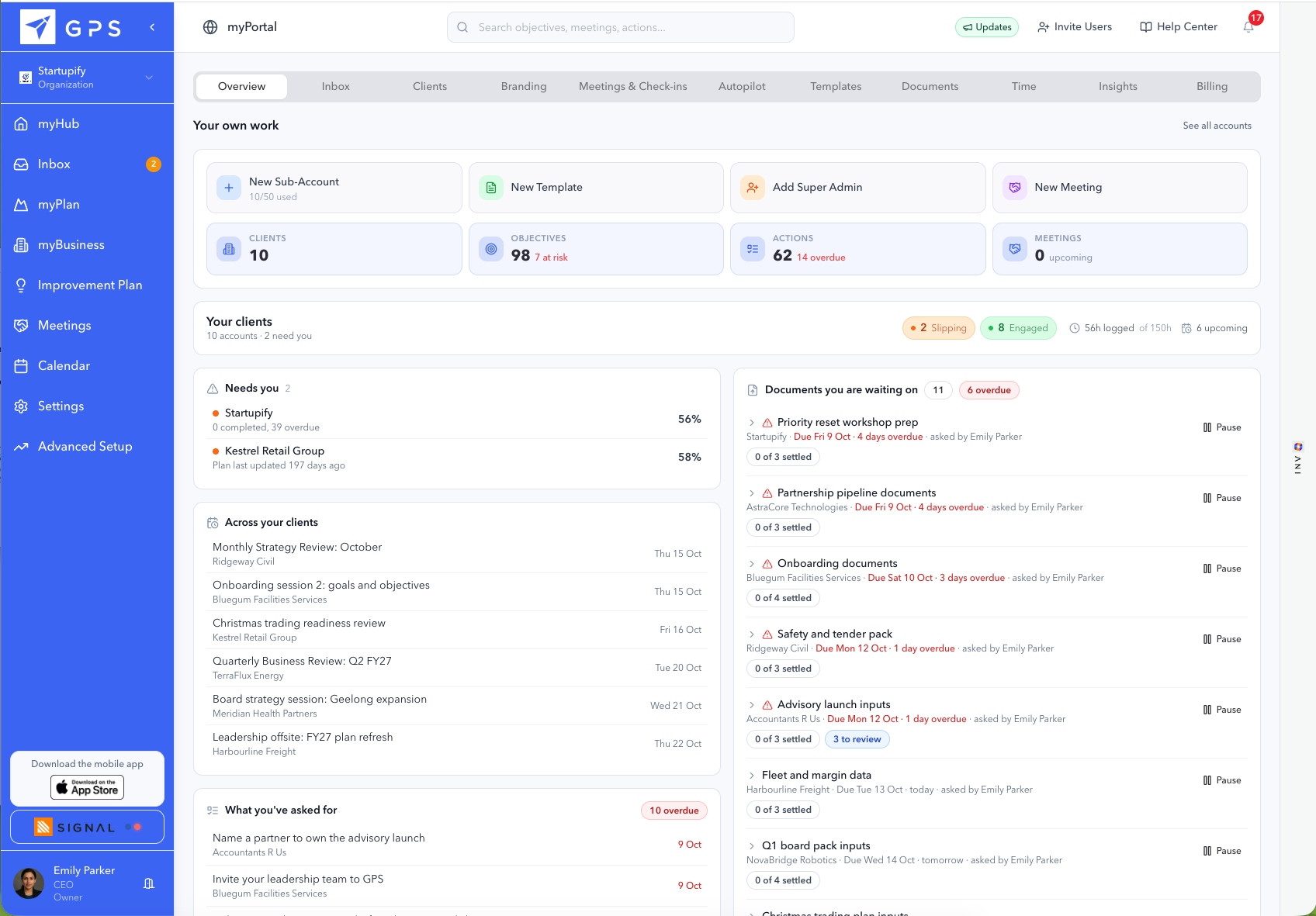
1Start with what needs your attention.
See the work across clients.
Review the overview before deciding where to focus your time.
Choose a hotspot or use Next and Back to follow the workflow.
Your practice, connected
Explore client oversight, conversations and templates with guided hotspots.
In this walkthrough
Start with what needs your attention.
See your client book, reusable methods and ANI defaults on actual product screens.
Find the client who needs you next.
See your client book, reusable methods and ANI defaults on actual product screens.
Understand the engagement before you dive in.
See your client book, reusable methods and ANI defaults on actual product screens.
Keep the client conversation connected.
See your client book, reusable methods and ANI defaults on actual product screens.
Know what you are still waiting on
See your client book, reusable methods and ANI defaults on actual product screens.
Build your method once. Reuse it thoughtfully.
See your client book, reusable methods and ANI defaults on actual product screens.
Start with structure, then add your expertise.
See your client book, reusable methods and ANI defaults on actual product screens.
Set how ANI supports your service.
See your client book, reusable methods and ANI defaults on actual product screens.
Keep client delivery moving
Actual myPortal screens show how your team can stay connected between client sessions.
In this walkthrough
Keep clients engaged between sessions.
Follow the rhythm from check-in questions to responses, meetings and client conversations.
Hear the pattern behind the update.
Follow the rhythm from check-in questions to responses, meetings and client conversations.
Plan the next client conversations.
Follow the rhythm from check-in questions to responses, meetings and client conversations.
Keep the client conversation connected.
Follow the rhythm from check-in questions to responses, meetings and client conversations.
Make room for the next engagement
Explore the weekly time view, entries, twelve-week capacity and portfolio insights.
In this walkthrough
See where client delivery time goes.
Review client time, consultant capacity and client performance together.
Review the work behind the hours.
Review client time, consultant capacity and client performance together.
Check whether the next engagement fits.
Review client time, consultant capacity and client performance together.
See patterns across the client book.
Review client time, consultant capacity and client performance together.
The plan you delivered, being run
Six screens, in the order an engagement actually runs: the plan you already wrote goes in, the client opens it on a Monday, a measure falls behind while there is still a quarter left, and the report the board reads is generated from your work.
In this walkthrough
Start from the plan you have
This is the screen where your deliverable stops being a document. Upload the strategy you wrote and it becomes goals, objectives and actions with owners on them, so the plan being executed is yours rather than a summary somebody retyped.
The whole strategy on one page
What your client opens, carrying your logo, your colours and your typeface. The page nobody rebuilds before a meeting, which means the version they read is the version you delivered.
Every measure, against where it should be today
Expected against actual is the one that matters to you. It means a measure turns amber in week five rather than in week twelve, so the quarterly opens on the two goals that are behind instead of on a status round.
The year, against today
Ten minutes before the quarterly, this is the hour you usually spend reconstructing what moved. The year is on one screen, against today.
What the board actually reads
Your work is what the board reads, generated from the plan rather than assembled the night before. For an accountant or a CFO service this is the pack that used to take two days.
ANI flags what needs action
Between your sessions, the client still asks questions. You set how this answers them once, across your whole book, so what they hear sounds like your practice.
Fourteen companies, read rather than consolidated
Six screens on the problem that every portfolio has: reporting arrives late, in a different shape from each company, and by the time it is readable the quarter it describes is over.
In this walkthrough
The whole strategy on one page
One of these per company, in the same shape. That is what makes two companies comparable without anybody reformatting anything, and it is the whole argument for a fund standardising a planning tool rather than a template.
The year, against today
The value creation plan agreed at close, against today. A company drifting shows here months before it shows in a board pack.
The gap at a glance
Actual against expected on every goal, dated. This is the two weeks an associate spends consolidating, already done, which puts those two weeks on the companies that are behind.
Who owns what, not who reports to whom
Who owns what inside the company, with vacant and overloaded seats flagged. For an operating partner this is the exposure conversation, twelve weeks before it becomes a missed board meeting.
Your numbers, arriving on their own
Figures arrive from the company’s own systems rather than being retyped into a template, which is the difference between monthly reporting and monthly chasing.
What the board actually reads
What the board reads, with the decisions to make rather than only the numbers to read. A venture fund with no governance rights gets the same thing, on a plan the founder keeps because they want it.
Try the workflow with Empiraa GPS.
Choose the next step for your client work.