
What is in the 90 seconds
The spreadsheets, inboxes and shared drives a practice actually runs on, and the single place they collapse into.
GPS connecting to the tools already in the practice, and a new client set up and invoiced before day one rather than in the week after it.
The timeline with goals, objectives and the dates against them, in a workspace of the client’s own rather than a document they were emailed once.
Objectives broken into actions with owners and dates, time logged against the goal it moves rather than a job code, and over-servicing named while there is still something to be done about it.
Scheduled check-ins going out and coming back on their own, and the client conversation happening against the goal it is about instead of in a thread nobody can find.
Progress moving as the work moves it, what the engagement is worth in time and money, and one snapshot carrying the client’s health, plan, margin and hours together.
The practice view across every client account at once: who needs attention, where the hours went and what each one earned.
The year-end problem
Most practices find out how a job went when the year closes.
The work was priced in March, delivered through winter, and reconciled in July by someone reading a timesheet export next to an invoice history. By the time the number lands, the job is finished, the client has renewed, and the lesson arrives too late to be worth anything.
The hours existed the whole time. They were just somewhere else.
GPS 1.23 puts Time and Money in myPortal. The hours, the budgets, the retainers and the margin now sit in the same place as the client's plan, and every hour ties to the client goal it moved.
Here is what's new:
- Every hour, against the goal it moved. Not just the client. The goal.
- Over-servicing you can still act on. Flagged in the month, not at year end.
- A gross profit and loss for every client. Month by month, owner only.
- Retainers that stay inside their promise. Hours over show in red, because that is what they are.
- Numbers that will not flatter you. GPS withholds a figure rather than inventing one.
It is rolling out to every Empiraa GPS account now. Let's dig in.
1. Every hour, against the goal it moved
Every time tracker in this market links an hour to a client, or to a job code. The hour tells you where it went.
GPS links the hour to the client goal it moved. That is one word different and a completely different question answered. "We spent 17 hours on Northside" is a fact you can do nothing with. "We spent 17 hours against a goal that moved 4%" is a conversation on Tuesday rather than a discovery in July.
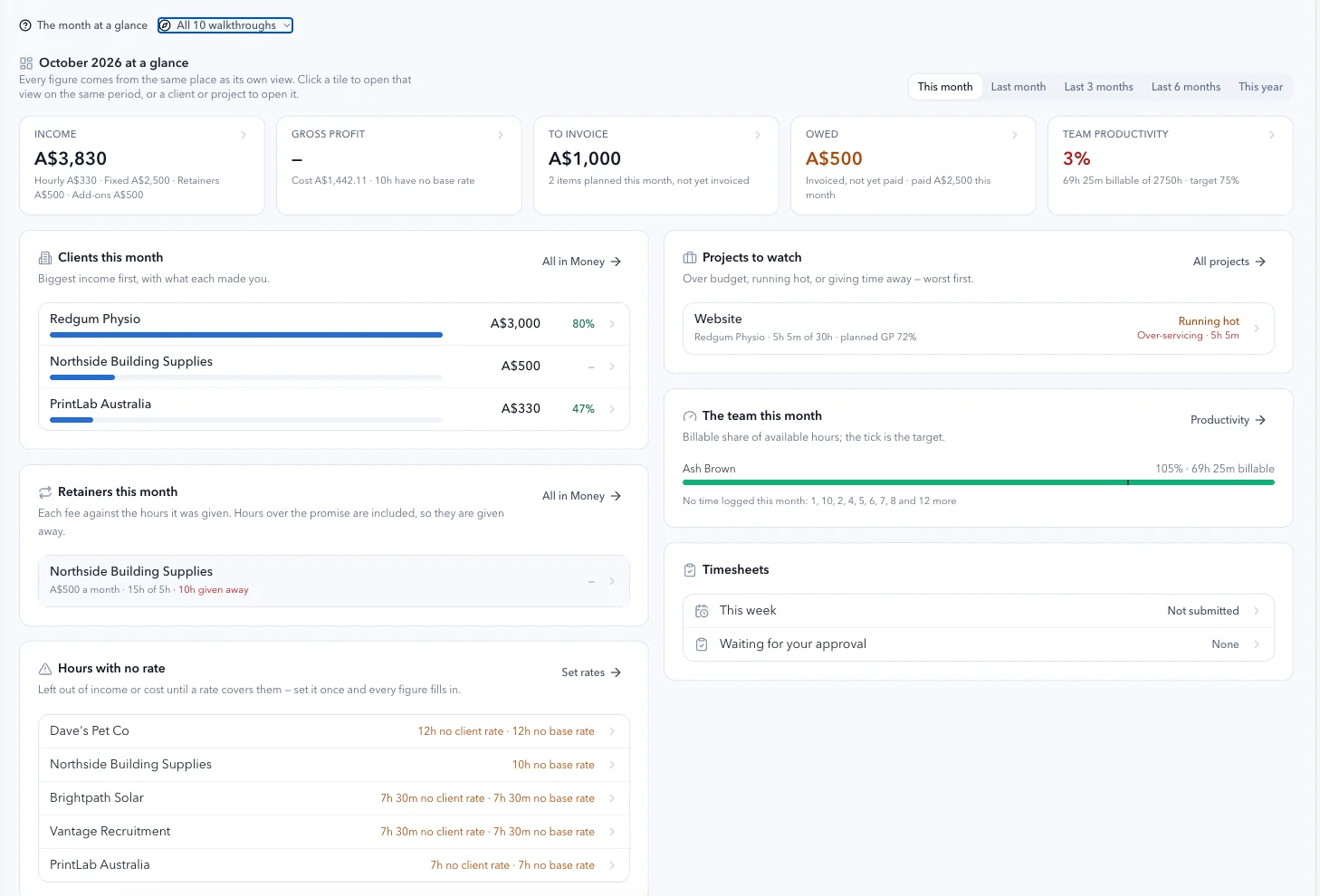
Start the timer from anywhere in GPS, fill the week in one grid, or let a meeting record its own time. Each entry says which client goal it was for and what kind of work it was. The work category decides whether it is billable, set once by the practice rather than argued over entry by entry.
Why this matters
An hour attached to a client tells you cost. An hour attached to a goal tells you whether the work is working. One is bookkeeping. The other is the thing you are actually selling.
2. Over-servicing, while you can still do something about it
A fixed-price job carries a price and an hours budget. GPS measures the hours burned against the progress the goals have actually made, not against the calendar.
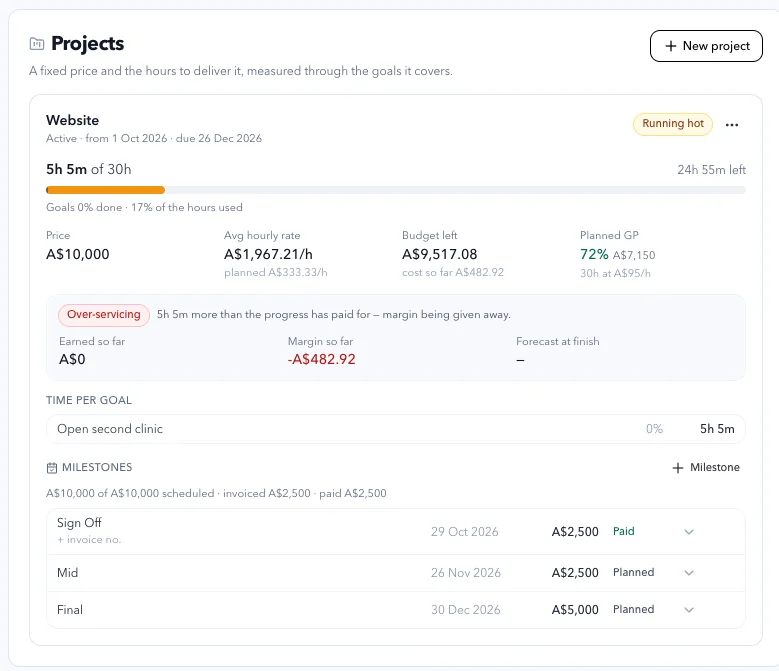
Go more than 15% past where the progress has paid for, and GPS says so: five hours more than the progress has paid for, margin being given away. Not in July. Now, while the scope conversation is still a conversation rather than a write-off.
Why this matters
Nobody decides to over-service. It accumulates, one favour at a time, and becomes visible only once it is sunk. Seeing it in the month is the entire difference between a scope conversation and a write-off.
3. A gross profit and loss for every client, month by month
Revenue by source. Direct costs, including expenses. Gross profit and GP%. A chart of gross profit by month, and a CSV when you want one.
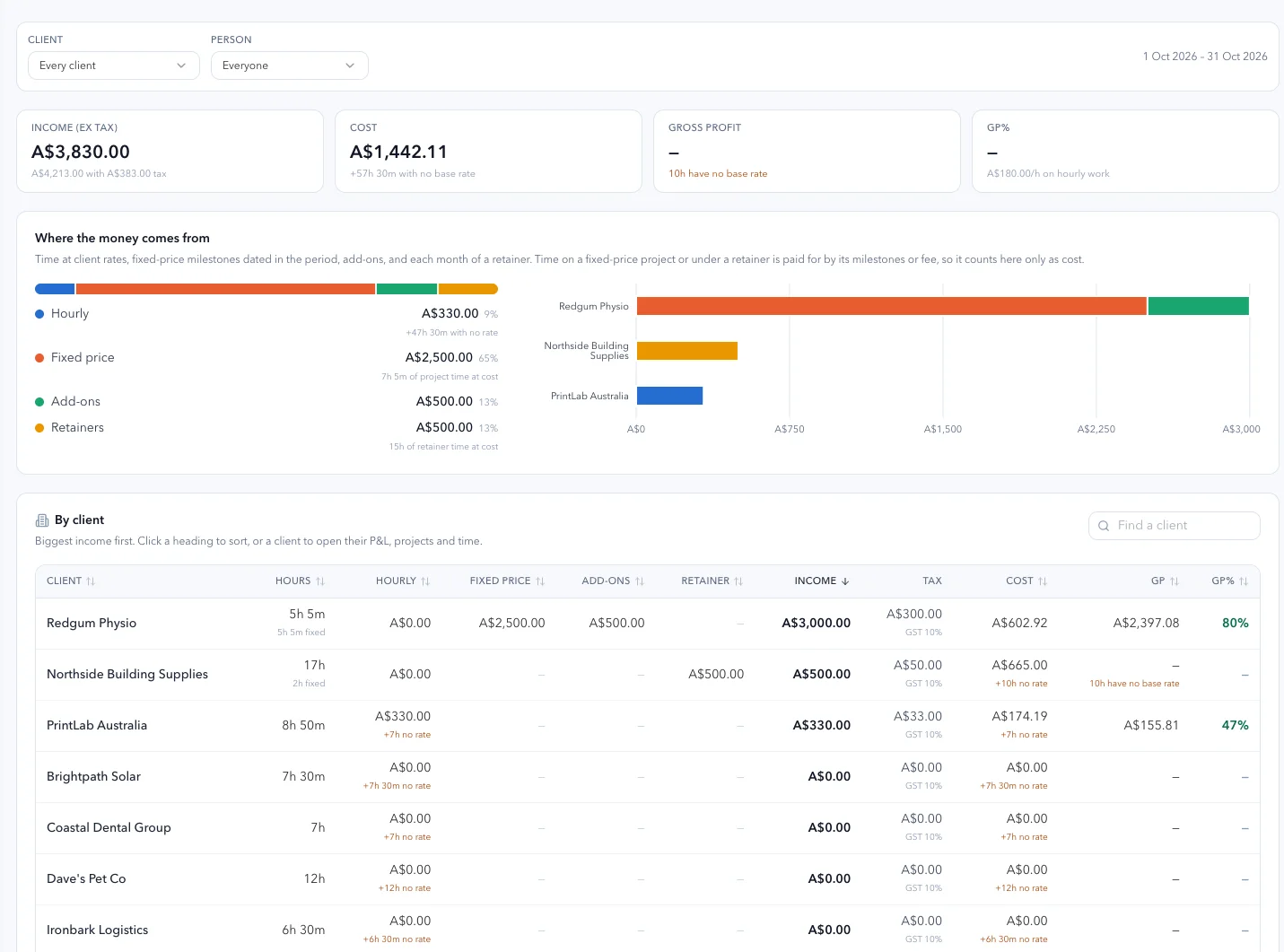
Gross, before your overheads. Your rent and your software are not in it, because this answers a different question: whether this client, this month, was worth the hours you put into it.
And it is yours alone. Your team sees hours and the billing schedule. They do not see margin. The client never sees any of it.
Why this matters
Most practices know their total profit and cannot break it down by client without a weekend. The clients subsidising the others are invisible precisely because the average looks fine.
4. Retainers that stop quietly becoming unlimited
A retainer is a fee a month with hours promised against it. GPS tracks what was promised and what was used.
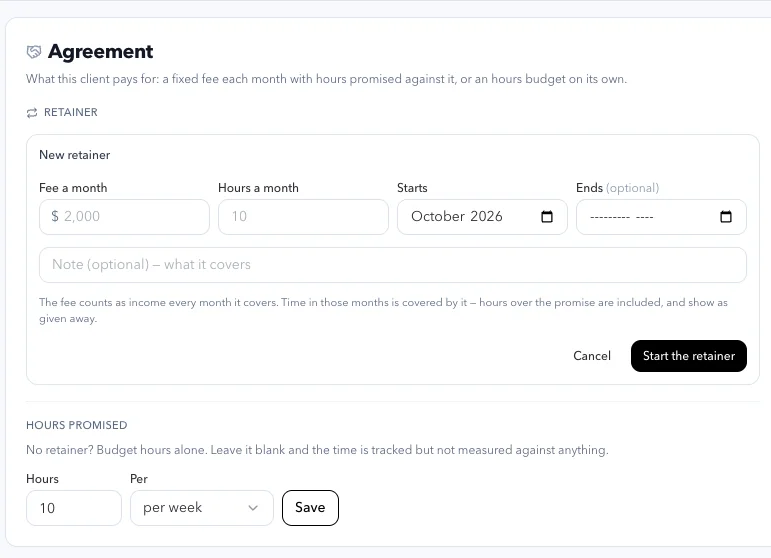
Hours over the promise show in red as given away, because that is what they are. Change a retainer and it changes from a month forward, so the months already billed keep the fee they had.
Why this matters
Retainer creep is the most expensive thing in a practice that nobody has a number for. Now there is one.
5. Numbers that will not flatter you
This is the part I would not blame you for skipping, and it is the one I would most like you to read.
Where an hour has no base rate, GPS counts those hours beside the figures rather than treating them as free, and it withholds gross profit instead of showing one that is too high. A month never looks better than it was.
Ask ANI what your GP is this month and it either quotes the figure or tells you it is withheld and why. It will not estimate one.
All amounts are ex-tax. Tax you collect is not revenue and it is never profit.
Why this matters
Every tool in this category rounds in its own favour, because a dashboard that flatters you gets opened more often. A number you cannot trust is worse than no number, because you will act on it. We would rather show you a gap than paper over it.
6. The billing schedule, in your own platform
GPS keeps what is due to invoice, what is owed and what is paid, across milestones, retainer months and add-ons, each with its invoice number.
The invoice itself is issued where it always was. Connect GPS and your own billing platform to the same AI assistant, ask it to draft them, confirm in your platform, then mark them off in GPS.
GPS does not send invoices and does not take payments. That is deliberate. Your billing platform is the system of record for money leaving and arriving, and two systems both believing they own that is how a practice ends up billing a client twice.
Also in this release: the rest of myPortal
Time and Money is one of ten areas in myPortal, and the others moved with it.
Overview. Who needs you this week, what you have asked each client for, and where the practice's hours went: the heaviest accounts, the ones nobody has touched, who is at or past their hours and who is stretched in the weeks ahead.
Clients. Every client account on one screen with engagement, goals, meetings and hours used against hours promised. Filter by consultant, by tag, or by whether it needs attention.
Inbox. Every client conversation in one place, each linked to the goal, objective or action it is about, so a thread is never orphaned from the work it belongs to.
Meetings and check-ins. Agendas built once and reused, recurring check-ins that go out on their own schedule, and the answers coming back filed against the client who sent them.
Documents. What you have asked each client for, what is still outstanding and what is overdue, with the chasing handled rather than sitting in your sent items.
Templates. Your own plans and meeting agendas, the Empiraa strategy library beside them, and a record of which client got which version of what.
Branding. Your logo, your colours and your typeface pushed into every client workspace, so the work arrives as yours rather than as ours.
Autopilot. What ANI is allowed to do and on whose behalf: its tone, how much reasoning each answer carries, its guardrails, and the frameworks and playbooks every client inherits.
Insights. ANI reading across the whole practice. Organisation progress, an objectives heatmap, risk analysis and benchmarking, and an answer to who is a churn risk without building a report to find out.
And underneath all of it, a workspace of their own for every client. Each client signs in to their own GPS: myHub for the week, myPlan for the goals and objectives you agreed, myBusiness, an improvement plan, their meetings, their calendar and their own inbox. On your branding, on their own account, with unlimited client users on every plan. They never see your rates, your margins or anything about another client.
Premium, at a price a practice can actually afford
A practice running this properly today is paying for practice management, a time tracker, a planning tool, a client portal and something to report out of.
GPS Practice is A$499 a month for 40 client accounts, with unlimited practice users and unlimited client users on every plan. That is A$12.47 per client account per month, with your whole team and all of their people inside it.
See the full price list for the other plans.
Try it on your own clients
Thirty days, your own clients, your own numbers. Nothing charged for 30 days, cancel any time. A card is required, and it converts automatically unless you cancel.
Already on GPS? Sign in and Time and Money is in myPortal now.
New to GPS? If you want to see the margin on a job while you can still do something about it, explore Empiraa GPS for professional services.